A tour of Configuration
Overview
The Configuration screen gathers in tiles what is set once and rarely touched afterwards: docks, yard, users, numbering, rates, notifications. Each tile appears only if its module is on in your warehouse and your role has the permission. A super admin with every module sees fifteen.
How to get there
Open Admin in the top bar and choose Configuration in the side menu, or use the Config shortcut on the home dashboard.
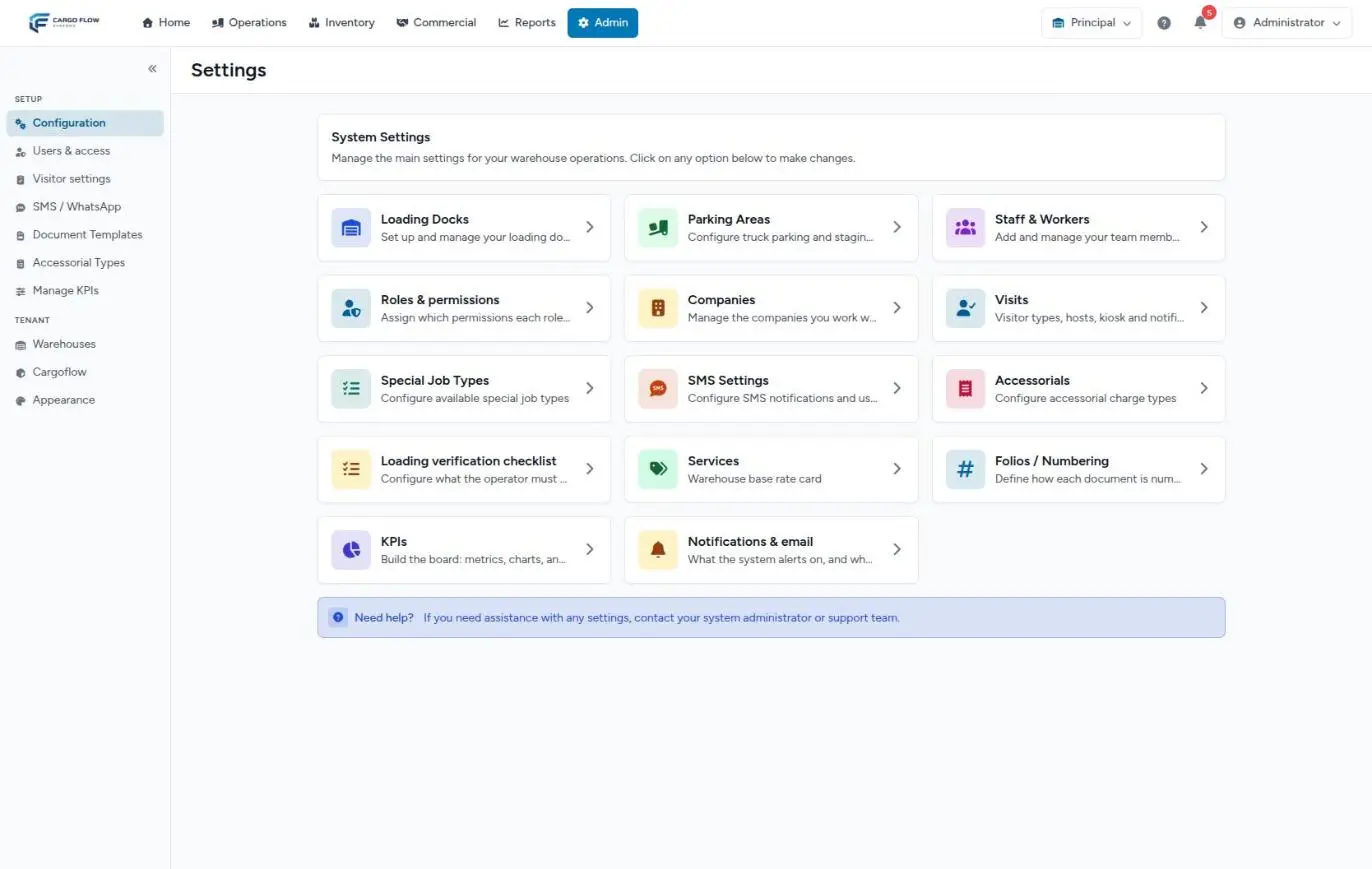
Each tile
Operations
| Tile | What it sets up | Shown with |
|---|---|---|
| Loading Docks | The warehouse’s docks: name, status and type. See Configure docks and yard. | Docks module and Configure Docks. The screen also requires Configure Users. |
| Parking Areas | Yards, their spot map and dwell alert times. See Configure the yard and spots. | Yard module and Configure Yard. |
| Special Job Types | The catalog of yard jobs that are neither loading nor unloading. See Special jobs. | Yard module and Configure Users (by default, super admin only). |
| Loading verification checklist | What the operator checks before loading a shipment. See Close a shipment. | Shipping module and create shipments (supervisors included). |
| Visits | Visit types, hosts, kiosks and notices. See Visit settings. | Visits module and configure visits or configure visitor registration. |
People and access
| Tile | What it sets up | Shown with |
|---|---|---|
| Staff & Workers | Team users. See Manage users. | Configure Users. |
| Roles & permissions | The permission matrix. See Roles and permissions. | Manage Permissions (super admin only). |
Commercial and documents
| Tile | What it sets up | Shown with |
|---|---|---|
| Companies | Opens the customer list. See Customers. | Configure clients. |
| Services | The warehouse’s base rate card. See Service catalog. | Billing module and manage pricing. |
| Accessorials | Extra charge types. See Accessorials and extra charges. | Accessorials module and configure accessorials. |
| Folios / Numbering | How each document is numbered. See Document numbering. | Configure Document Numbers. |
Notifications, KPIs and appearance
| Tile | What it sets up | Shown with |
|---|---|---|
| SMS Settings | SMS and WhatsApp. See SMS and WhatsApp settings. | External notifications module and Configure Users. |
| KPIs | The KPI board cards. See Building the KPI board. | KPI module and manage KPIs. |
| Warehouse appearance | The warehouse colour theme. See Appearance. | Appearance permission. |
| Notifications & email | Warehouse alerts and the internal invoice copy. See Notifications per warehouse. | Configure Users or manage billing, and the warehouse with receiving or billing. |
What is not in Configuration
- Document Templates, Accessorial Types, Visitor settings, SMS / WhatsApp and Manage KPIs also have direct entries in the Admin side menu.
- Warehouses, Cargoflow and system Appearance are in the Tenant group of the Admin menu, super admin only. See Warehouses and modules.
- Your language, password and personal theme are in the menu under your name. See Your profile and account security.
What is saved per warehouse
Docks, yards, numbering, services, notifications, SMS and the warehouse theme are saved for the active warehouse. Users, roles and customers belong to the system and are assigned to one or more warehouses. If you manage several warehouses, switch before configuring each.
Example: what an admin sees
Ana López has the admin role in a warehouse with docks, yard, receiving, shipping and billing. She sees the Loading Docks, Parking Areas, Companies, Loading verification checklist, Services, Folios, Warehouse appearance and Notifications & email tiles (the last because she can manage billing). She does not see Staff & Workers, Roles & permissions, Special Job Types or SMS. If she opens Loading Docks, she gets "You do not have access to this page": that screen requires Configure Users.
Troubleshooting
I see the Loading Docks tile but opening it says I have no access.
- The tile is shown with Configure Docks, but the screen requires Configure Users. Ask the super admin to add the docks.
The Notifications & email tile is missing.
- The warehouse has neither receiving nor billing, or you lack both permissions that show it.
Configuration does not appear in the menu.
- You have none of the permissions that show that entry. Check whether you have permission for any tile and ask your admin for the address.
Need help?
If something did not work as expected, our support team can help you.
Was this article helpful?