Accessorials and extra charges
Overview
An accessorial is an extra service done on the spot and billed separately: shrink wrap, repalletizing, labeling, pallet exchange, overtime, liftgate. It is captured on the job or document where it happened, at that moment, and the system turns it into a charge that travels to the invoice of that same operation.
This article explains how the catalog is set up and what happens to the charge. Step-by-step capture is in Capture an accessorial.
Before you start
- Accessorials module enabled in the warehouse. Without it, the menu, the catalog and the capture panels don’t appear. It works best with the Docks module (it is captured against the dock job) and needs Billing for the charge to be created.
- Permissions — Configure Accessorials for the catalog (Super Admin, Admin, Supervisor); Capture Accessorials to record them (Super Admin, Admin, Supervisor, Worker); View Accessorials for the list.
- A billing service with a price in the service catalog for each accessorial. See Service catalog.
Who captures and where
- The operator, from their app, when finishing their own dock job. They only see accessorials that apply to that job type and are not supervisor-only.
- The supervisor (anyone allowed to configure accessorials), from the receipt, shipment, cross-dock or job detail, on any job. Besides the accessorials catalog they see the rest of the warehouse’s service catalog.
- On a receipt or shipment without a dock job, only the supervisor (for example, to add overtime during review).
The accessorials catalog
Go to Admin › Accessorial Types.
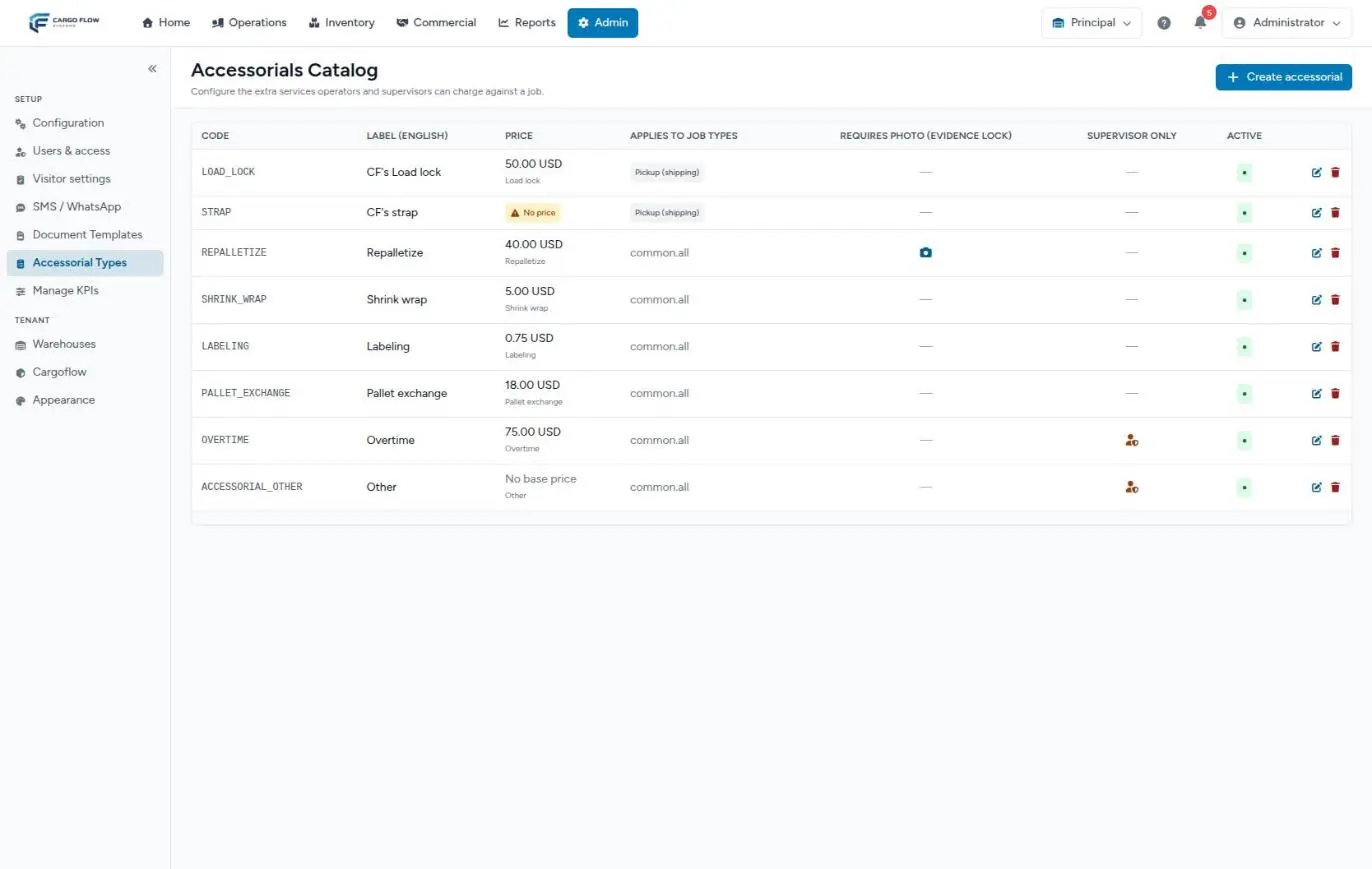
Each row shows the code, the label, the price (with the name of the catalog service it comes from, or the No price warning), the job types it applies to, a camera icon if it requires a photo, a supervisor icon if it is supervisor only, whether it is active, and the edit and delete buttons.
Create or edit an accessorial: field by field
Click Create accessorial (or the pencil of an existing one).
| Field | What it is | Rules |
|---|---|---|
| Code | Short identifier (for example, shrink_wrap). Used to link the billing. | Required and unique in the warehouse. |
| Label (English) and (Spanish) | What operators see in their language, and the name on the list. | Fill in both. |
| Applies to job types | Pickup for a shipment, delivery for a receipt, special job or internal. | Empty = applies to all. |
| Requires photo and Minimum photos | Evidence lock: asks for photos when captured. | At least 1 photo. |
| Requires quantity | Asks how many units were done. | Without it, the quantity is 1. |
| Supervisor only | The operator cannot capture it (typical for overtime). | — |
| Billing unit | How the unit is named (per pallet, per hour…). | — |
| Billing service (price) | The warehouse catalog service the price comes from. Search by name or code; Unlink service removes it. | Without it, the accessorial shows “No price”. |
| Extra fields | Data requested at capture: key, English and Spanish label, type (text, number, email or phone) and whether it is required. | Only declared fields are stored. |
| Active and Order | Whether it is offered and in what position. | — |
Save: “Accessorial created” or “Accessorial updated”.
Where the price comes from
An accessorial has no price of its own: it takes it from the linked billing service. With that service, the charge uses the client’s negotiated rate or, if there is none, the catalog base price. If the accessorial has no linked service, at capture the system looks in the general catalog for a service with the same code (with or without the accessorial_ prefix) and, if it finds one, links them on its own.
Capturing services from the general catalog
Supervisors can capture on a job any active service from the general catalog, not only accessorials (except handling and storage, which are billed automatically). The first time they capture one, the system creates its accessorial type in the accessorials catalog, supervisor only, without a photo and linked to that service. That is why types nobody created by hand sometimes show up under Accessorial Types.
The charge’s path to the invoice
- The charge is created when the accessorial is captured, with that date, and goes to Services to Invoice with the number of the document it was captured on.
- If it was captured on a shipment that has not left yet, it waits and enters the pool when the shipment is marked as shipped. If the shipment is cancelled, it is not billed.
- On a truck with several documents, whoever captures chooses in Charge to the document (the charge goes on that document’s invoice) or The whole truck (it gets its own invoice). With a single document, it goes to that document.
- If the job carries goods for several clients, you choose whom to bill.
- Editing the accessorial updates its charge while it is not invoiced. Deleting it removes the pending charge; if it was already invoiced, remove the line on the invoice.
- A charge voided from the invoice does not come back even if the accessorial is edited.
The full path from each origin to the invoice: Where each charge comes from.
What happens in other modules
- Billing — the charge shows in Services to Invoice and on its operation’s invoice, grouped with the handling. See Generate invoices.
- Operator job report — lists the job’s accessorials and flags those with a pending photo.
- Shipment close — the close window shows the accessorials applied.
- Client — does not see them in the portal; sees them as lines on their invoice.
Example
You set up “Repalletize”: code repalletize, applies to pickup and delivery, requires a photo (minimum 1), requires quantity, billing service “Repalletize” (40.00 per pallet). An operator finishing the unloading of a Sample Imports receipt captures 3 pallets with their photo: a 120.00 charge is created and goes out on that receipt’s invoice, together with its handling.
Best practices
- Link each accessorial to its billing service before operators use it.
- Require a photo on services the client tends to dispute (repalletizing, damage).
- Mark as supervisor-only what needs authorization (overtime, “other”).
- Limit each accessorial to the job types where it makes sense: the operator’s list stays short and error-free.
- Deactivate instead of deleting.
Troubleshooting
The operator can’t find an accessorial.
- It is inactive, supervisor-only or doesn’t apply to that job type.
The accessorial’s charge came out without a price.
- It has no linked billing service, or the service has neither a base price nor a client rate.
The charge came out at 0.
- In the classic version, the client has that service’s row with a 0 rate. Enter the rate or delete the row.
“This accessorial has charges and cannot be deleted. Deactivate it instead.”
- Deactivate it: it is no longer offered and its history is kept.
Accessorial types nobody created appear.
- They are catalog services a supervisor captured on a job. You can edit or deactivate them.
The job types column shows technical text instead of “all”.
- It is a translation quirk of that screen: it means the accessorial applies to all job types.
FAQ
Can I delete an accessorial from the catalog?
Only if it has never been captured. If it already has charges, deactivate it.
Does the client see accessorials?
They see them on their invoice, as lines grouped with the operation they belong to. Evidence photos stay in the system as internal backup: they don’t travel with the invoice email and are not shown in the portal. If the client asks for them, download them from the job and upload them to the invoice as a backup document.
What if the accessorial has no price?
The charge is recorded anyway, without a rate, and you price it on the invoice (in the new version, it stays out until resolved). The right fix is to link a billing service so it doesn’t happen again.
Need help?
If something did not work as expected, our support team can help you.
Was this article helpful?