Service catalog
Overview
The service catalog is the warehouse’s base rate card: everything that gets billed, with its base price. Each client’s rates, quotes, accessorials, special jobs and the charges added on invoices all come from here. If an item is not in the catalog, it cannot be billed.
Before you start
- Permission Manage Pricing (Super Admin and Admin by default).
- Module Billing enabled in the warehouse.
- Each warehouse has its own catalog: switch to the right warehouse before editing it.
The screen
It is under Admin › Configuration, Services card (“Warehouse base rate card”).
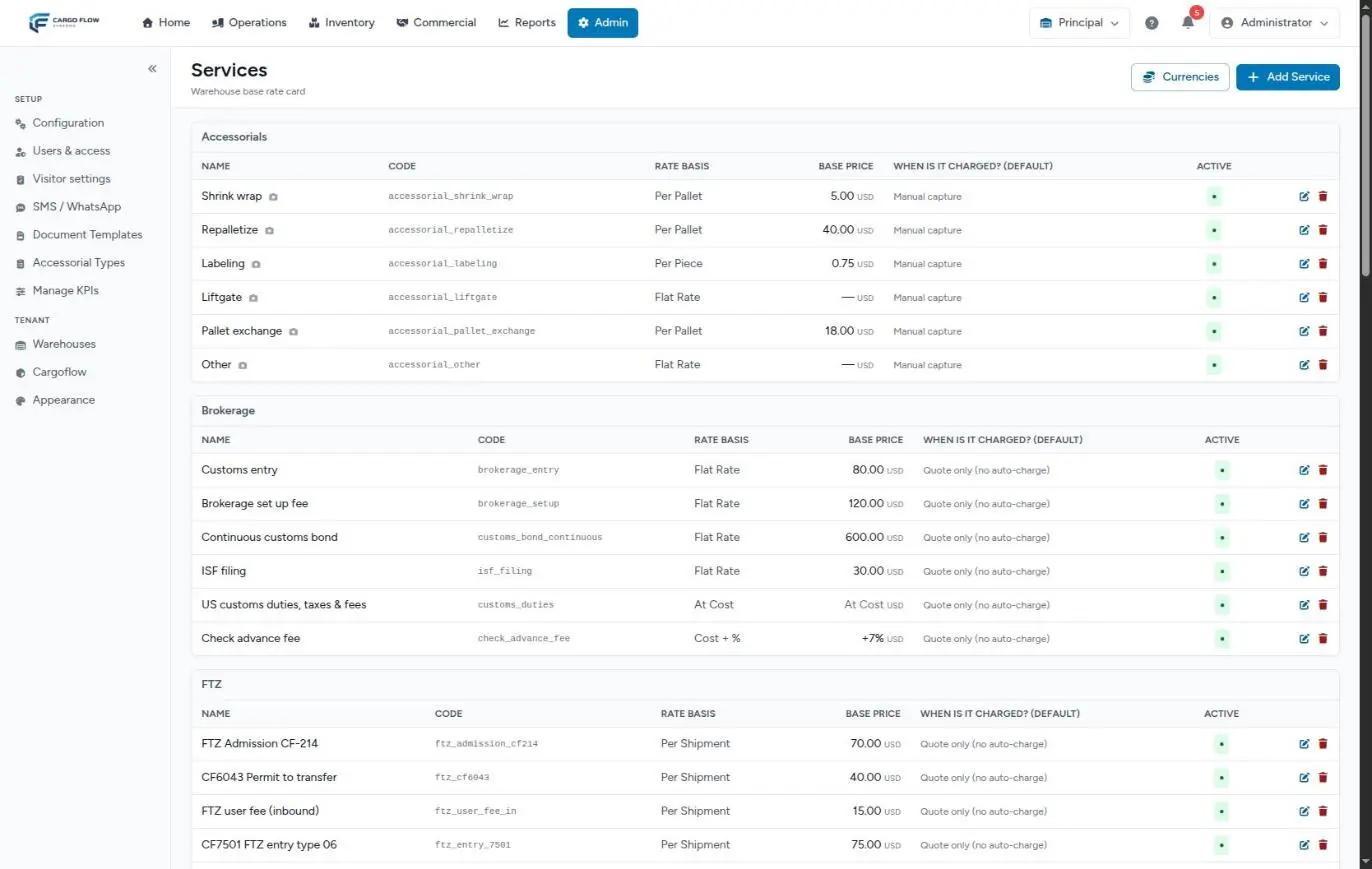
Services are grouped by category: load/transload, unload/handling, storage, accessorials, value added, FTZ, brokerage, overtime, materials and other. Each row shows name, code, rate basis, base price (or the markup, for cost plus), when it is charged (the suggested value) and whether it is active. Services exclusive to a client carry the Exclusive badge with the client’s name.
Add or edit a service: field by field
Click Add Service (or the pencil of an existing one).
| Field | What it is | Rules |
|---|---|---|
| Category | Where it is grouped in the catalog and search boxes. It only groups: it does not change how it is billed. | Required. |
| Name in English and Spanish | What appears on the invoice and the screens depending on language. | Both required, up to 120 characters. |
| Code | Internal identifier; links the service to client rates and to charges. | Built automatically from the English name. You can unlock it to type your own (normalized to lowercase and underscores), but it must be free in the warehouse. |
| Description | Supporting text; copied to quotes. | Optional, up to 500 characters. |
| Rate Basis | What it is charged on (see below). | Required. |
| Base Price | The price for anyone without their own rate. | Empty = “No price”. |
| Markup % | Only for cost plus. | 0 to 100. |
| Minimum / Maximum Charge | Floor and cap per invoice. | The maximum cannot be below the minimum. |
| Free Days | For storage and per-day services. | Whole number, 0 or more. |
| Currency | The base price’s currency. | Only enabled ones. |
| Unit Label | How the unit is named on screen and on the invoice (for example, “per label”). | Up to 48 characters. Empty = the basis name. |
| When is it charged? (default) | The suggested charge moment (see below). | Required. |
| Active and Order | Whether it is offered, and its position within the category. | — |
Save: “Service created” or “Service updated”.
Rate bases
| Basis | What is multiplied by the rate |
|---|---|
| Per Pallet | Pallets on the document, based on each product’s packaging |
| Per Pallet / Day | Pallets × days (storage) |
| Per Shipment | One per document (for services charged automatically; for handling, see the warning in Handling charges) |
| Flat Rate | A fixed amount (same as per shipment) |
| Per Carton / Per Piece | Cartons or pieces on the document |
| Per Weight (lb) | Pounds on the document |
| Per Hour | Hours captured |
| Per Day | Days captured, or the shipment’s stay minus free days |
| At Cost | The actual cost, no markup |
| Cost + % | The captured cost plus the markup. See At-cost and cost-plus services |
When it is charged
- On receipt confirmed — the service is added to the receipt.
- On shipment closed — added to the shipment; for storage it means charging the stay at shipment.
- Daily storage accrual — storage is charged every night.
- Manual capture — only when someone captures it (accessorials, invoice charges).
- Internal job — meant for special-job services. In practice, any service added as a special-job line is billed when the job is completed, whatever this value says.
- Quote only (no auto-charge) — exists to quote and capture by hand; it is never billed on its own.
The services the engine uses
The system looks up four services by their code, so do not change their code:
receiving_handling— Receiving handling.shipping_handling— Shipping handling.crossdock_handling— Cross-dock handling.storage— Storage (the only one that accrues on its own).
Handling and storage are not offered for manual capture or for adding on an invoice.
Enabled currencies
The Currencies button opens the warehouse’s currency list. Only currencies from the international catalog can be chosen, no free text, and at least one must remain. They are the ones offered in the service, quote and manual invoice forms. See Currencies.
Where the catalog is used
- Client rates — each row is a catalog service. See Rate card and prices.
- Quotes — the active catalog is preloaded; the preset templates are built from its codes. See Quote and win a client.
- Accessorials — each accessorial takes its price from a service.
- Special jobs — their service lines come from the catalog. See Special jobs.
- Invoices — what you add by hand comes from the catalog.
- QuickBooks — the code is the file’s Item column.
Deactivate or delete
- Deactivate — the service stops being offered in search boxes, stops providing a base price and, if it is storage, stops being billed to anyone without their own rate. Its history is kept.
- Delete — asks for confirmation and is only allowed if no client has a rate for that service (“This service has client pricing rules and cannot be deleted”). Charges and invoices that already use it keep its name.
Example
Your warehouse starts offering labeling with the client’s barcode. You add: category Value Added, name “Customer barcode labeling” (plus its Spanish name), basis Per Piece, base price 0.45, currency USD, unit label “per label”, charged by Manual capture. The code becomes customer_barcode_labeling. Then you create its accessorial and link it to this service.
Best practices
- Write clear names in both languages: clients read them on their invoice.
- Choose the rate basis carefully from the start.
- Use “Quote only” for services you want to offer but always bill by hand.
- Deactivate instead of deleting.
- Don’t change the code of services in use.
Troubleshooting
“This service has client pricing rules and cannot be deleted.”
- Deactivate it.
The system rejects the code I typed because it is taken.
- Another service in the warehouse already has it. Pick another or let the system build it.
A service doesn’t appear when adding charges.
- It is inactive or exclusive to another client.
I don’t see the Services card in Configuration.
- The warehouse doesn’t have the Billing module or your role lacks Manage Pricing.
FAQ
If I change the base price, does it affect every client?
Those without their own rate for that service (or with it at 0), and only for charges created from that moment on. Existing charges keep their price.
Can I change a service’s code?
You can, but the system warns you: the code links the service to client rates and charges. Changing it unlinks them. Avoid it on services in use, and never on the four engine services.
What is “Quote only” for?
For services offered on quotes and added by hand to the invoice when they happen (for example, customs paperwork), but that must never be billed on their own.
Need help?
If something did not work as expected, our support team can help you.
Was this article helpful?