The life of stock: every action that creates, moves or changes goods
Summary
A customer's goods live in stock lines: one per product, location and lot. Each line has a total and a breakdown by status (reserved, damaged, on hold…). Nobody types those numbers by hand: they only change through specific actions in the system, and every action leaves a signed row saying who, when and why.
This article puts all of those actions in one place. It answers the three most common questions in a warehouse: "why is this quantity here?", "who moved it?" and "why can't I ship it?". For the detail of each screen, follow the links to the module articles.
Before you start
- Module: the warehouse needs the inventory module. Without it, a receipt is confirmed and a shipment is closed as records only: they close the document and notify the customer, but they neither create nor deduct stock.
- Viewing: the View Inventory permission (by default held by admin, supervisor, worker and client portal accounts) opens the stock screen, each line's history and the Adjustments History.
- Moving: each action has its own permission; the table below says which. By default a worker only captures receipts and counts: they do not adjust, relocate or change statuses.
- Catalogs: the product and the location must exist first. See Products and units and Locations and zones.
How a stock line is stored
In Inventory › Stock each row is a line. The Quantity column is the physical total; the columns to the right say how much of that total is in each status.
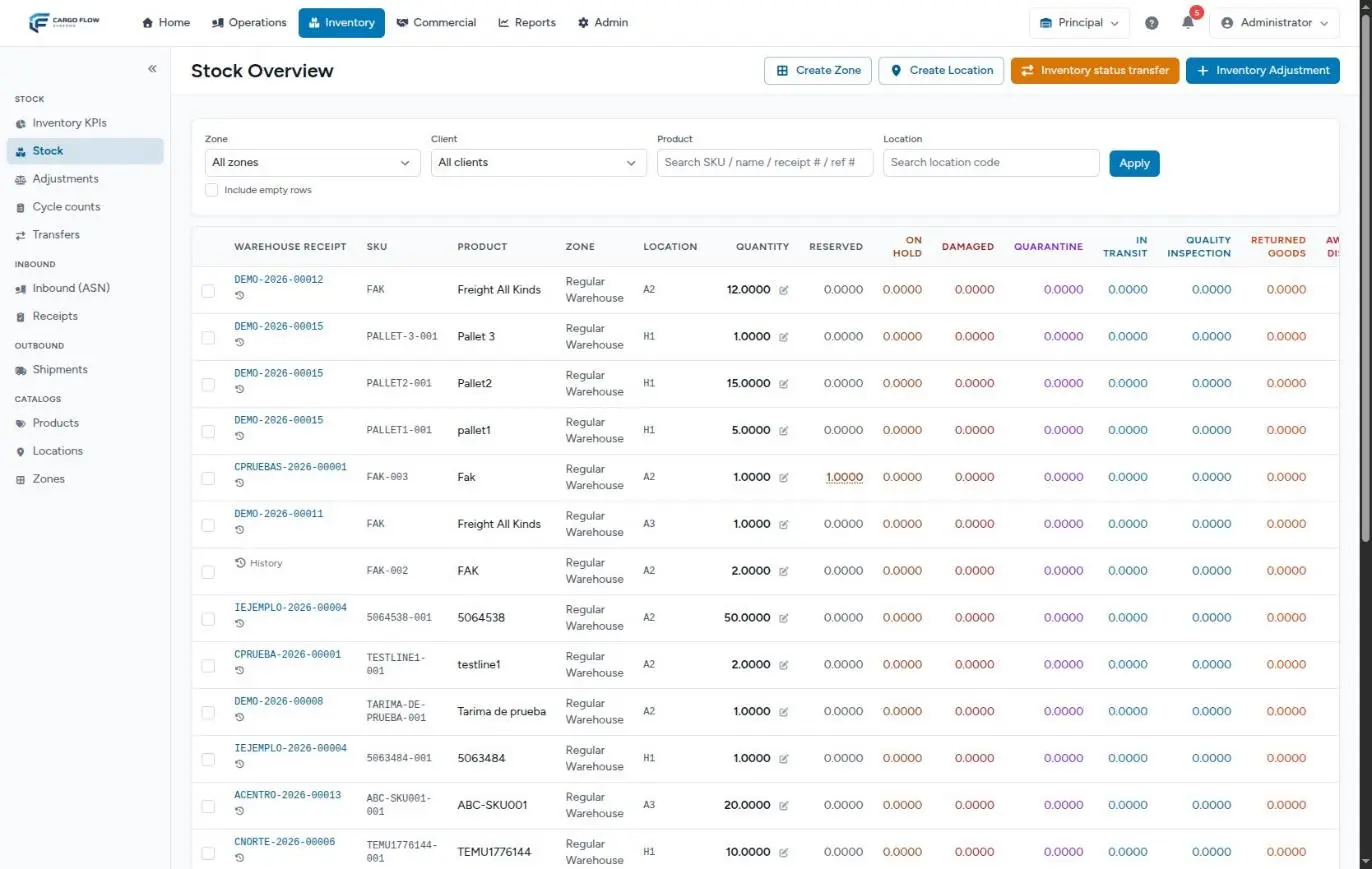
| Status | Who sets it | Can it be shipped? |
|---|---|---|
| Available | Nobody: it is calculated. It is the total minus every other status. | Yes |
| Reserved | The system, when a shipment is allocated. | Only by the shipment that reserved it |
| Damaged | The receipt capture (damaged quantity) or a status change. | No |
| On hold, Quarantine, In transit, Quality Inspection, Returned Goods, Awaiting Disposal | A person, with a status change. | No |
Each line also keeps its first arrival date. It anchors the storage that is billed and the aging the customer sees, and it decides what goes out first when there is no expiry date.
Every action in one table
| Action | Effect on the line | Where it is recorded | Who can (permission · default roles) |
|---|---|---|---|
| Confirm a receipt | Adds the received quantity at the captured location; the damaged part is in the total but in the Damaged column. | Line history (Received, linked to the receipt) · Audit log (Receiving and Receipts) | Confirm Receipts · admin, supervisor |
| Transfer within the warehouse | Subtracts at the origin and adds at the destination. The customer's total does not change. | Line history (two Transfer rows) | Transfer Inventory · admin, supervisor |
| Transfer to another warehouse | Leaves the origin at once; enters the destination when it is received there. | Line history in each warehouse · incoming transfers inbox | Transfer Inventory, with access to the destination warehouse |
| Status change | Moves quantity between columns. The total does not change. | Line history (Status change) | Adjust Inventory · admin, supervisor |
| Manual adjustment | Adds to or subtracts from the total. | Adjustments History · line history (Adjustment) | Adjust Inventory · admin, supervisor |
| Approve a cycle count variance | Creates an adjustment with the Cycle Count reason. | Adjustments History · the plan's task becomes Adjusted | Approve Cycle Counts · admin, supervisor (never the person who counted) |
| Allocate a shipment | Moves quantity from available to Reserved. The total does not change. | The shipment's allocation list (no row in the line history) | Create Shipments · admin, supervisor |
| Release the allocation | Returns what was reserved to available. | The shipment goes back to Confirmed | Create Shipments · admin, supervisor |
| Close a shipment | Subtracts what was loaded and releases the whole allocation, including the part not loaded. | Line history (Shipped, linked to the shipment) · Audit log (Shipments) | Ship (Close Shipments) · admin, supervisor |
| Cross-dock | Enters and leaves the staging location XD-STAGE; ends at zero. | History of the XD-STAGE line · the cross-dock's tab | Create Crossdock Jobs · admin, supervisor |
| Edit a confirmed receipt | Applies the net difference as an adjustment. | Adjustments History (reason receipt_edit) | Confirm Receipts · admin, supervisor |
| Correct the customer of a confirmed receipt | Moves the lines to the new customer without changing quantities. | Adjustments History (reason client_amendment, quantity 0) · Audit log (Identity corrections) | Amend Document Identity · admin, supervisor |
| Cancel a confirmed receipt | Subtracts what that receipt had added. | Adjustments History (reason receipt_cancel) · Audit log (Receipts) | Confirm Receipts · admin, supervisor |
| Cancel a shipment | Nothing: it is only allowed with no live allocation. | Audit log (Shipments) | Create Shipments · admin, supervisor |
Inbound
Confirming a receipt
It is the only normal way in. While the receipt is Pending, In progress or Captured, the goods do not exist in inventory even if they are physically in the warehouse. When Confirm receipt is clicked:
- Each line adds its received quantity (converted to the product's base unit) at the captured location and lot. If there was no line with that product, location and lot, one is created.
- The captured damaged quantity is part of that total, but goes straight into the Damaged column: it is not available.
- Everything else is available. Nothing goes into quarantine or on hold by itself: if needed, a status change is made afterwards.
- The receipt's actual arrival date becomes the line's first arrival date. If the line already existed and the new date is earlier, it is moved back; never forward.
- Each line gets a Received row in its history, linked to the receipt. If the line had a discrepancy against the notice, the reason says so (short or over).
The system will not confirm if a line with a quantity has no location, a lot-tracked product has no lot, or a line with a discrepancy has no evidence photo. The whole path is in From notice to stock.
Put-away is not a separate step
There is no put-away task after receiving: the location is chosen when each line is captured and the goods are born there on confirmation. The tablet scanner can suggest a location for a product, but suggesting moves nothing. If the goods are later taken to their final place, that is a transfer.
Relocating and changing status
Transfer within the warehouse
In Inventory › Transfers › New transfer, type Within warehouse (A → B). Only what is available moves: reserved and blocked quantities stay. The destination line inherits the origin line's first arrival date, so relocating does not reset storage. It leaves two Transfer rows in the history: out and in.
Transfer to another warehouse
It takes two steps. The origin warehouse sends (the goods leave at once) and the destination warehouse receives them in its Incoming transfers (in transit) inbox. In the meantime the goods count in neither warehouse. There is currently no button to cancel a transfer in transit. See Stock transfers.
Status change
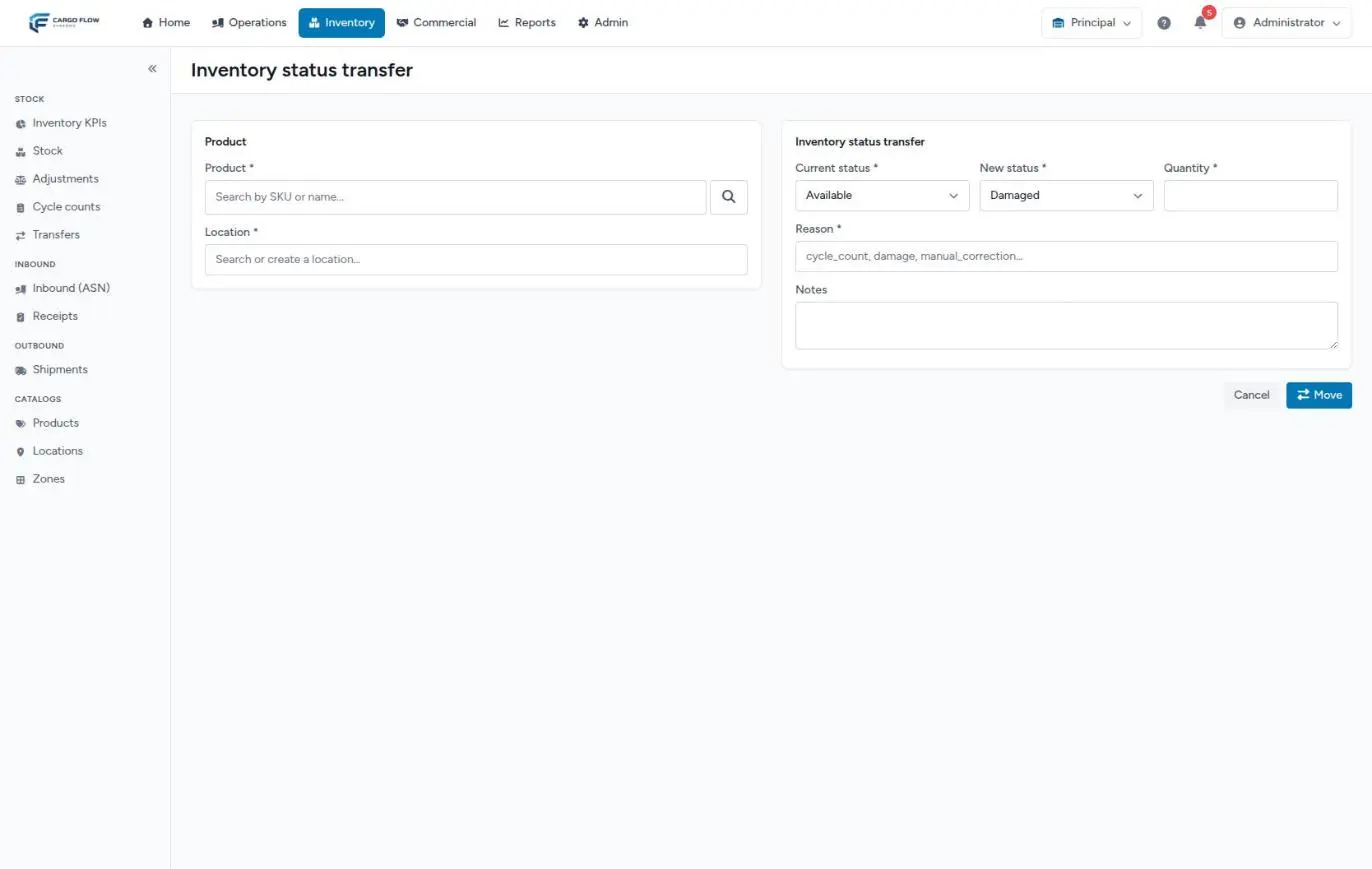
From the line's checkbox on the stock screen, Inventory status transfer button. It moves a quantity from one status to another (for example, 5 pieces from Available to Quarantine) and asks for a short reason, up to 64 characters. The total does not change, but what leaves Available can no longer be allocated. There is no approval step.
Adjustments and counts
Manual adjustment
In Inventory › Adjustments › Inventory Adjustment (or with the line's pencil). It changes the total with a reason from a closed list: Cycle Count, Damaged, Found, Lost, Expired, Adjustment or Other (with Other, notes are required). It is entered as a difference (+/−) or as a target quantity. There is no approval: it applies on save.
There is a floor: the total cannot drop below what is committed (reserved plus blocked statuses), nor below zero. If you try, you get an error saying the quantity cannot drop below what is committed. See Inventory adjustments.
Cycle count
A plan takes a snapshot of the system quantity for each line in scope. When someone counts, matching lines are approved automatically and the rest wait for approval (or a recount, if the variance exceeds the threshold). On approval, the system records an adjustment with the Cycle Count reason that takes the line from the snapshot quantity to the counted one. Whoever counted cannot approve their own task.
Allocating and shipping
Allocating
When a shipment is confirmed (or with the allocate button on its timeline), the system sets goods aside at specific locations. Earliest expiry first; on a tie, what arrived first. It never takes expired goods, blocked statuses, staging or non-pickable locations, or another customer's goods. What is set aside moves to the Reserved column; the total does not change.
Allocation leaves no row in the line history: its record is the allocation list at the bottom of the shipment screen. So if you see reserved quantity, the question is "which shipment holds it?", not "which movement made it?".
Closing the shipment
It is the only normal way out. The operator records what went on the truck, but the total does not go down until a supervisor clicks Close Shipment. Then, for each allocation: what was loaded is subtracted, the whole allocation is released (including the part not loaded, which becomes available again) and a Shipped row is left, linked to the shipment. A close cannot be undone. See From order to departure.
The tablet scanner has a picking screen that verifies the product and records what was picked, but it does not deduct either: only the close does.
Cross-dock
Cross-dock goods do pass through inventory, if only for minutes: their receipt adds them at the virtual location XD-STAGE, the system allocates them to the same cross-dock's shipment and the close takes them out. XD-STAGE is not pickable, so no regular shipment can take those goods. See Dock, yard and cross-dock.
Correcting or undoing a document
| What you want to do | What happens to the goods | When it is not allowed |
|---|---|---|
| Edit a confirmed receipt | The system compares the old capture with the new one per product, location and lot, and applies only the difference as an adjustment (reason receipt_edit, with the reason you wrote in the notes). The receipt stays Confirmed. | If those goods were already allocated, shipped or moved. |
| Cancel a confirmed receipt | Subtracts what the receipt added (reason receipt_cancel), deletes its uninvoiced charges and sets the notice back to Sent. | If any charge was already invoiced or the goods are no longer intact. |
| Correct the customer of a confirmed receipt | The lines move to the new customer with the same quantity; a zero adjustment is left as a record. | See Cancel or correct a receipt. |
| Release the allocation of a shipment | What was reserved becomes available; the shipment goes back to Confirmed. | On cross-dock shipments. |
| Cancel a shipment | Nothing, because it requires no allocation. | If it is Loading or Shipped, or still has an allocation: release it first. |
| Return goods from a closed shipment | There is no reversal of the close. Goods that come back enter with a new receipt (or an adjustment, if there is no document). | Always: the close is final. See Cancel, release the allocation or return a shipment. |
Where each movement is recorded
There are three places, and each answers a different question:
| Screen | What it shows | What it does not show |
|---|---|---|
| Line history (the line's clock on the stock screen) | Everything that touched that line: Received, Shipped, Adjustment, Transfer and Status change, with before, after, source and user. | Allocations. And on lot-tracked lines it can omit adjustments or status changes that did not store the lot. |
| Adjustments History (Inventory › Adjustments) | Every adjustment in the warehouse: manual ones and those the system creates (cycle count, receipt edit or cancel, customer correction). | Transfers, status changes, normal receipts and shipments. |
| Audit log (Reports › Audit log, Read Audit Reports permission) | Changes to documents: receipts, shipments, advance ship notices, cross-docks, customers, templates and identity corrections. | No inventory movement at all: adjustments, transfers and status changes do not reach it. |
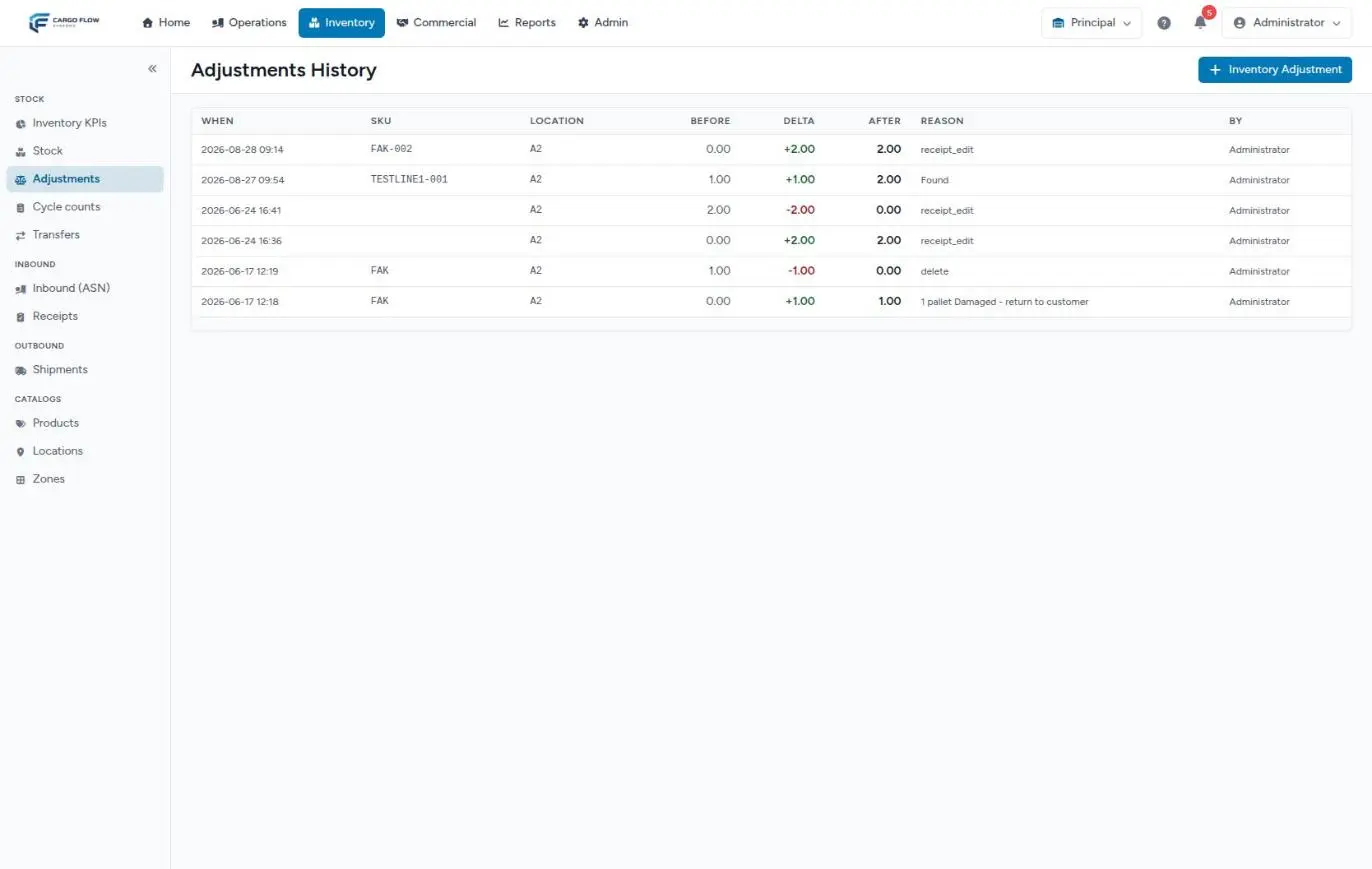
receipt_edit, when a confirmed receipt is edited).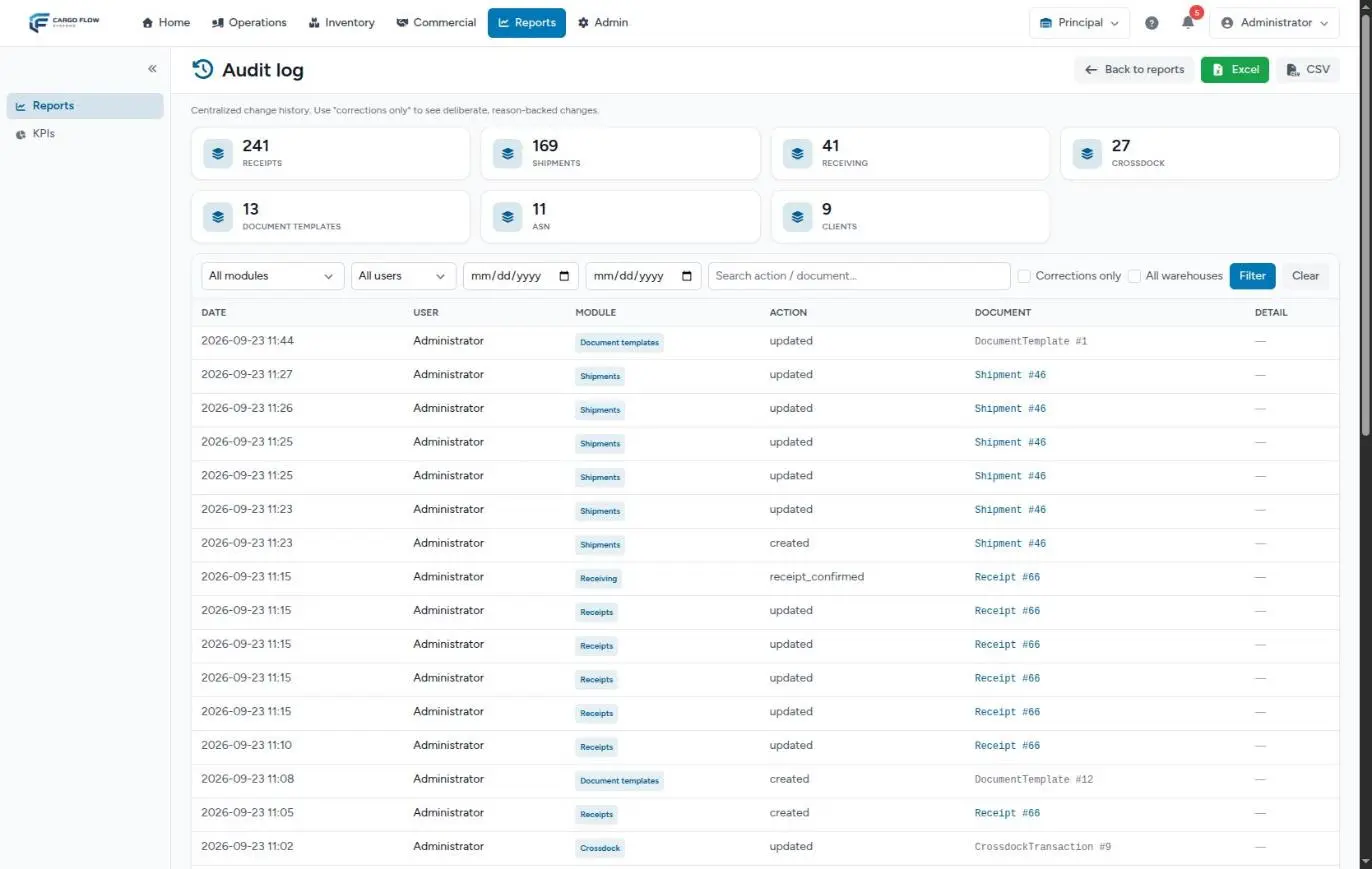
The customer sees none of the three: they see their inventory in the portal and in the reports you send them. See Inventory, KPIs, warehouse and language in the portal and WMS reports.
Example: the life of one SKU over two weeks
Northern Trading Co. stores SKU CN-1001 (cases of 12; the base unit is the piece). This is how its line at location A-01-01 changes:
| Day | Action | Total | Reserved | Damaged | Available | Where you see it |
|---|---|---|---|---|---|---|
| September 1 | Luis Pérez confirms receipt CNORTE-2026-00021, captured in pieces: 120 received, 6 of them damaged. | 120 | 0 | 6 | 114 | History: Received +120 |
| September 2 | Transfer of 24 pieces to B-02-03 (fast-moving rack). | 96 | 0 | 6 | 90 | History: Transfer −24 (and +24 at B-02-03) |
| September 3 | Status change: 6 pieces from Available to Quarantine, reason "lot review". | 96 | 0 | 6 (+6 in quarantine) | 84 | History: Status change |
| September 8 | Shipment SH-CNORTE-2026-00009 for 60 pieces is confirmed and allocated. | 96 | 60 | 6 (+6) | 24 | The shipment's allocation list |
| September 9 | The operator loads 58; Ana López closes the shipment. | 38 | 0 | 6 (+6) | 26 | History: Shipped −58 |
| September 12 | Cycle count: 37 counted. Carlos Ruiz approves. | 37 | 0 | 6 (+6) | 25 | Adjustments History: Cycle Count −1 |
| September 15 | The customer authorizes destroying the damaged goods: status change from Damaged to Available and an adjustment of −6 with reason Damaged. | 31 | 0 | 0 (+6) | 25 | History: Status change and Adjustment |
Look at September 9: 60 were allocated and 58 loaded. The close subtracted 58 and released all 60 from the allocation, so the 2 that did not go on the truck became available again by themselves. And September 15: a negative adjustment cannot touch what is in a blocked status, which is why the damaged goods were first returned to available.
What can go wrong at each step
We unloaded, but the goods do not show up.
The receipt is not confirmed. In Captured it is waiting for a supervisor's review. Also check that the warehouse has the inventory module.
The goods exist but the shipment does not allocate them.
They are in a blocked status, expired, at a non-pickable or staging location, or belong to another customer. Check the line's status columns and the location.
I cannot transfer or adjust a line.
The quantity you ask for exceeds what is available (transfer) or would leave the total below what is committed (adjustment). Find which shipment holds the allocation and release it, or return the blocked goods to available.
It will not let me edit or cancel a confirmed receipt.
Its goods were already allocated, shipped or moved, or one of its charges is already invoiced. Correct with an adjustment and explain in the notes which receipt it belongs to.
After approving a count, the quantity is wrong.
There were movements at those locations between generating the plan and approving it. Check the line history and compensate with an adjustment.
There is reserved quantity no shipment recognizes.
Someone used Reserved in a status change. Return it with another status change from Reserved to Available.
Good practices
- Confirm receipts on the same day and with the actual arrival date: storage and aging come from it.
- Use the right action: a transfer to relocate, a status change for what cannot be shipped, an adjustment only when the physical count does not match.
- Mark damaged goods as soon as you find them, so no shipment allocates them.
- Write notes someone else can verify: document, photo, person.
- Review the Adjustments History every week; if an SKU or a location keeps appearing, there is a process problem.
- To explain a difference to the customer, start with the line history: the first row where After goes down says which document or which person did it.
Frequently asked questions
Where is the put-away step?
It does not exist as a separate step. The location is captured on the receipt and the goods are born there. If they move later, it is a transfer.
Why doesn't an adjustment appear in the audit log?
The audit log records document changes, not inventory movements. Adjustments are in the Adjustments History; transfers and status changes, in each line's history.
Why is stock reserved if nobody has loaded it?
Allocating is not loading: it is setting goods aside for a confirmed shipment. The allocation goes away when the shipment is closed or when it is released from its screen.
Why doesn't the total match what is available?
Because the total includes what is reserved, damaged and in any blocked status. Available is what remains.
Can the API or EDI move stock?
No. They only create documents (advance ship notices and shipments) and query stock. Goods move when someone confirms the receipt or closes the shipment in the warehouse. See Integrations: API and EDI in operations.
Need help?
If something did not work as expected, our support team can help you.
Was this article helpful?