Integrations: where API and EDI input lands in operations
Summary
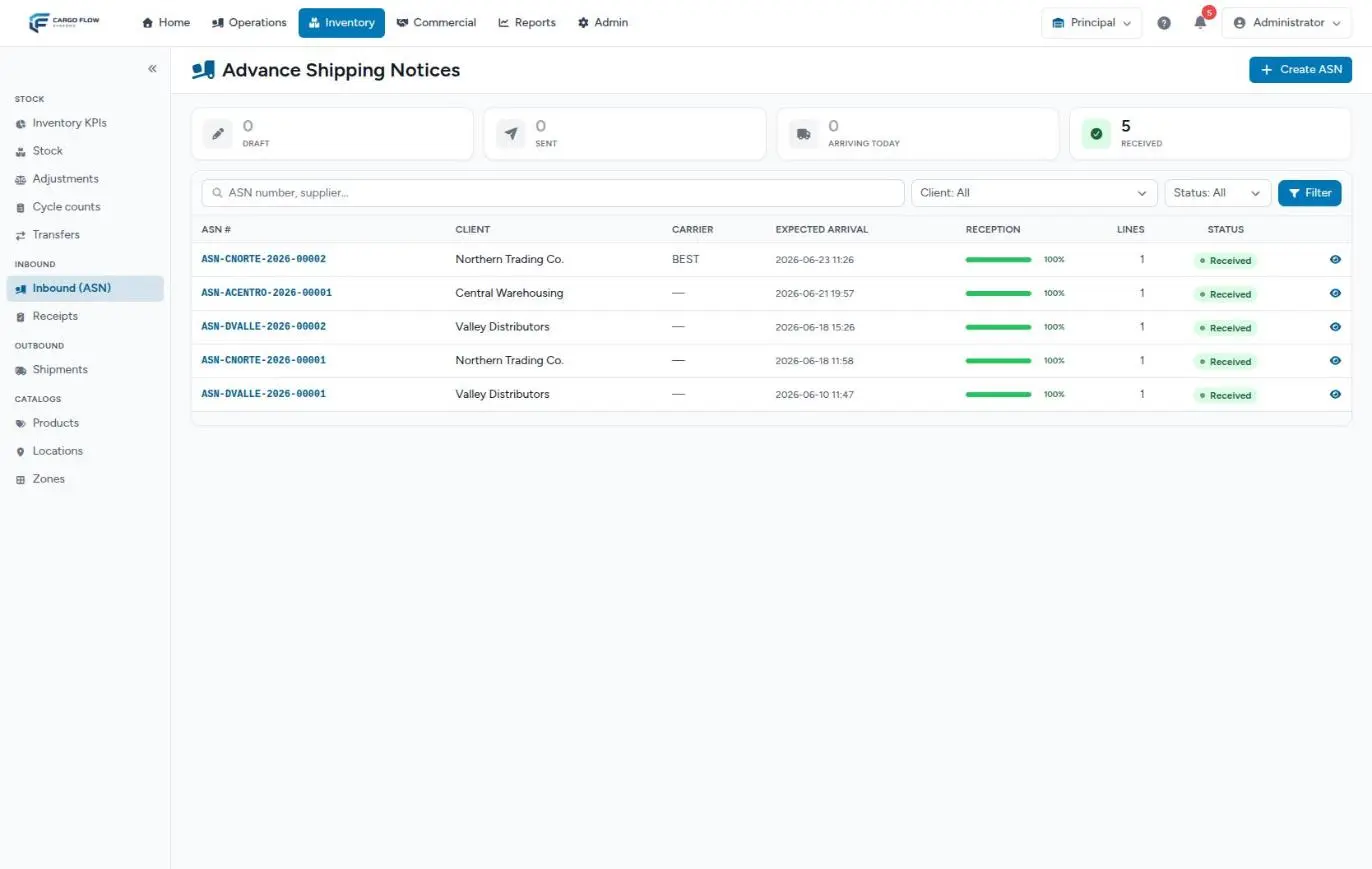
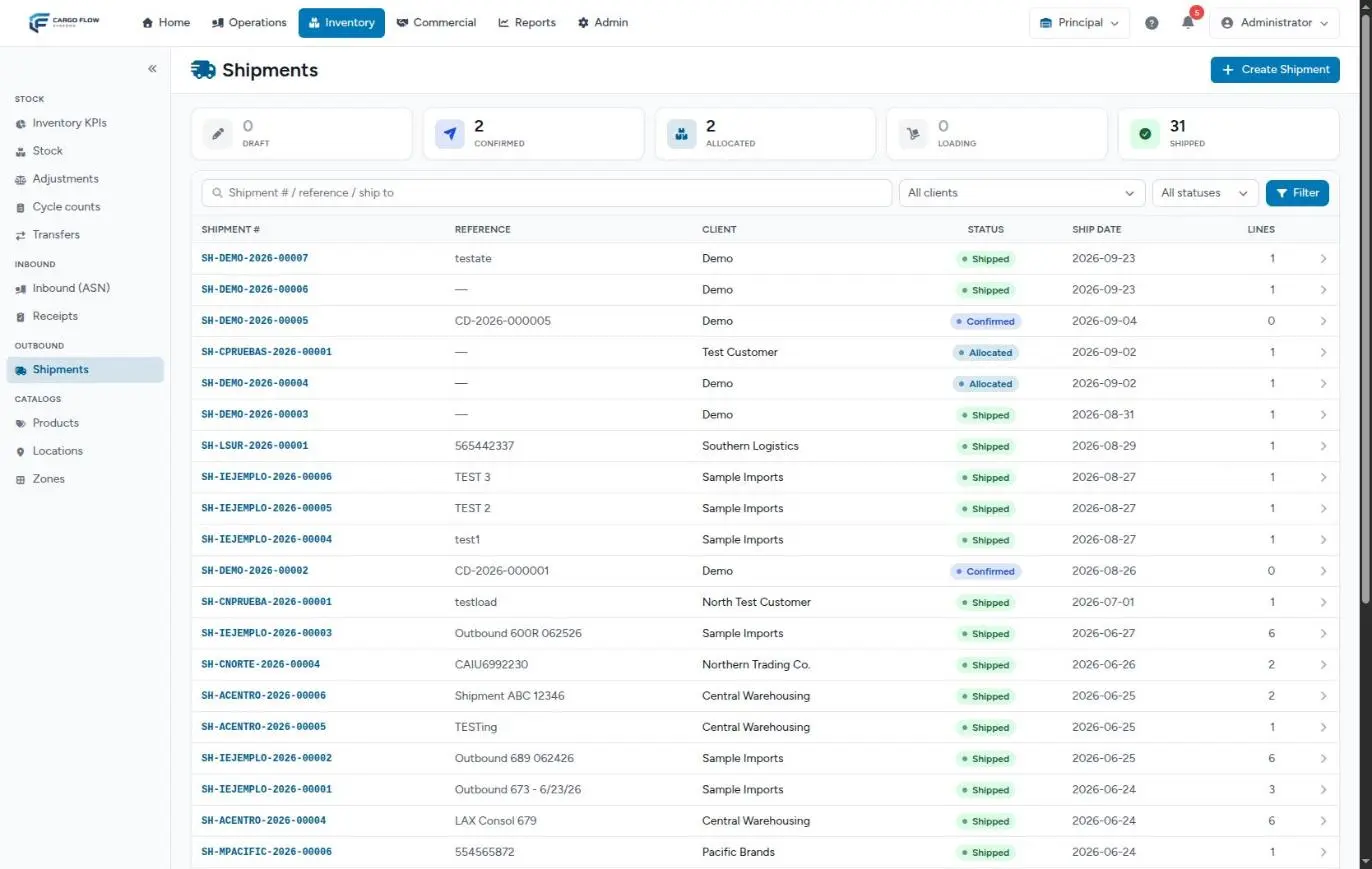
The API and EDI are not a separate path: they are another way into the same flows as always. An advance ship notice sent by the customer's system lands in the same receiving inbox as one captured by hand, and an order lands in the same shipments list. From there, your team works as usual: dock, capture, confirmation, loading and close.
What changes is at the edges: which status each document arrives in, which data it carries, and what is sent back to the customer's system when the warehouse confirms a receipt or closes a shipment. This article puts those edges in one place. The technical side is in Connecting a system through the API and EDI: what works today and what does not.
Before you start
- Modules: the warehouse needs the API module (and the EDI module for X12 files), plus receiving and shipping. With a module off, the service addresses answer "not found".
- Setup: today the Cargoflow team does it: it creates an integration user tied to one customer and their warehouses and hands over an access key. There is no screen to generate or revoke keys, or to register callback addresses or EDI partners.
- Catalog: the customer's products must exist with the same SKU their system sends. There is no code mapping.
- Permissions: the integration does not use roles: its key only sees its customer and their warehouses. On the warehouse side, each step needs the usual permissions (Capture Receipts, Confirm Receipts, Create Shipments, Ship).
What comes in and where it lands
| What the customer sends | Through | Where it appears | In which status |
|---|---|---|---|
| Advance ship notice | API | Inventory › Inbound (ASN), and its receipt in Inventory › Receipts | Notice Sent; receipt Pending |
| Advance ship notice (943 or 856) | EDI | Same | Same |
| Shipment order | API | Inventory › Shipments | Confirmed, and Reserved or partial if there was stock |
| Shipment order (940) | EDI | Same | Same |
| Products, adjustments, cancellations, changes | — | They do not come in by integration | They are done in the warehouse |
Compare with the other paths: a notice captured in the system can stay in Draft, and a portal order always arrives as a Draft for the warehouse to review. What comes in by integration arrives already committed. The full paths are in From notice to stock and From order to departure.
An advance ship notice coming in by integration
- It arrives — with carrier, trailer, expected date, their reference (
external_ref), notes and lines by SKU, quantity and unit. If a single SKU does not exist in the customer's catalog, the whole request is rejected (API) or the file is quarantined (EDI): nothing is half-created. - The receipt is born — just as when a notice is sent by hand: Pending, with the expected lines and the truck details. The bell alerts the configured roles.
- It is worked like any other — the driver signs in, the supervisor assigns a dock and links the receipt (the reference and trailer number help the system suggest it), the operator captures and a supervisor confirms.
- On confirmation — the goods enter stock, the charges are created, the email goes to the customer's contacts and, if their system has a callback address, it gets the receipt-confirmed callback.
A shipment coming in by integration
- It arrives — with reference,
external_ref, carrier, requested date, destination (name, city, state), notes and lines. - It comes in confirmed and allocates by itself — by expiry, as far as stock allows. If nothing is available, it stays Confirmed with no allocation; nobody gets an error, so check the shipments list. The bell alerts the team.
- It is worked like any other — linked to the truck at the dock, loaded, verified and closed by a supervisor.
- On close — it leaves stock, the BOL and packing list are generated, the charges are created, the email goes out and, on the integration side, the shipment-closed callback and, for an EDI partner with the 945 enabled, the 945 file.
What the customer can query
| Query | What it returns |
|---|---|
| A receipt | Its status and, per line, expected and received. |
| A shipment | Its status and, per line, ordered and allocated. |
| Stock | By SKU, location and lot: expiry, quantity, available and first arrival date. Up to 200 rows per page. |
There is no query to list notices or shipments: the customer's system has to keep the number it receives when creating them.
What the warehouse sends back
| When | What | How it arrives |
|---|---|---|
| On receiving their request | The notice and receipt numbers, or the shipment number | In the response, immediately |
| On processing an EDI file | Processed, or quarantined with the reason | In the response, immediately |
| On confirming a receipt | "Receipt confirmed" callback: number, their reference, status and, per line, expected, received and damaged | To their web address, signed with a shared secret |
| On closing a shipment | "Shipment closed" callback: number, references, carrier, tracking and, per line, ordered and loaded | To their web address, signed |
| On closing a shipment (EDI partner with 945) | The 945 file, with what was loaded per line | It is generated and stored; today it is not delivered automatically |
| Always | The receipt-confirmed and shipment-shipped emails | To the customer's contacts, like any other |
Limits to know
| Limit | What it means in operations | What to do |
|---|---|---|
| Repeated API requests are not detected | If the customer's system retries, the notice (with its receipt) or the shipment (with its allocation) is duplicated. | Cancel the duplicate in the warehouse; ask the integrator to check before retrying. EDI does recognize repeated files. |
| Nothing can be cancelled or changed by integration | A customer change arrives as a new document. | Correct or cancel in the warehouse. |
| A key can do everything | There are no read-only keys. | Only give it to whoever runs the integration. |
| No request limit | A misconfigured system can send many requests in a row. | Ask the integrator to space out their queries. |
| No EDI screen | A quarantined file (unknown SKU, unsupported type) alerts nobody in the warehouse. | Ask the customer for the response they received, or write to us. |
| Only 943, 856 and 940 in, and 945 out | There is no 944, 846 or 997, and no SFTP or AS2: only the web service. | Confirm it with the partner before committing to the exchange. |
| The 945 is not transmitted | The partner does not receive it even though it is generated. | Ask us for the file and deliver it through the agreed channel. |
| Shipments with several customers | Callbacks and the 945 only go to the shipment's main customer. | Do not mix an integrated customer's goods with others' in one shipment. |
Example: a day of Sample Imports over EDI
- 6:15 — Sample Imports' EDI provider sends a 943 with 3 lines. The warehouse answers "processed": notice ASN-IEJEMPLO-2026-00040 (Sent) and its Pending receipt are created.
- 6:20 — A 940 with 2 lines arrives for the next day. Shipment SH-IEJEMPLO-2026-00022 is created, Confirmed; one line is fully allocated and the other only in part: it is partial.
- 6:25 — Another 943 arrives with a new SKU that is not in the catalog. It is quarantined with the reason "unknown SKU" and nothing is created. Nobody in the warehouse sees it: the integrator notices it in the response and reports it.
- 10:00 — Ana López adds the product. The customer resends the file with new control numbers (with the same ones, the system would return the previous result).
- 11:30 — The first 943's receipt is unloaded and confirmed: the goods enter stock and the customer's system gets the receipt-confirmed callback. Ana releases the shipment's partial allocation and allocates again: now complete.
- Next day, 12:00 — The shipment is closed: their system gets the shipment-closed callback and the 945 is generated, which the Cargoflow team delivers to the partner.
What can go wrong at each hand-off
Integration → warehouse: the integrator says the address does not exist.
The API (or EDI) module is not enabled for that warehouse. The addresses answer "not found" instead of "unauthorized" on purpose.
Integration → warehouse: the notice does not appear.
The request was rejected for an unknown SKU or missing data, or the EDI file was quarantined. Ask for the response the customer's system received.
Integration → warehouse: the notice appears twice.
The customer's system retried. Cancel the extra receipt and notice.
Order → allocation: the shipment arrived but has no allocation.
There was no available stock. Receive the goods and allocate from the shipment.
Warehouse → integration: the customer did not get the callback.
Their address did not answer at that moment, or no address is registered for that event. The callback is not retried later; their system can query the status.
Warehouse → EDI partner: the partner asks for the 945.
Today it is not transmitted. Write to us with the shipment number.
Good practices
- Ask the integrator to always send their own reference: it is what matches your documents with their orders.
- Set up the customer's catalog before the first request and tell them when you add products.
- Every morning, check the Confirmed shipments with no allocation: those are the integration orders that did not fit.
- Run the full test before going live: notice, resending the same file, order, close and a file with a non-existent SKU.
- If the key leaks, write to us right away to revoke it.
Frequently asked questions
How can I tell on screen what came in by integration?
Today no screen shows the source: the system stores it, but the list and the detail do not display it. The clues are that the notice arrives already Sent without anyone in the warehouse capturing it, and that the shipment arrives Confirmed (portal ones arrive as Draft). If you need to confirm it, write to us with the number.
The customer wants to cancel an order sent through the API
It cannot be done by integration. Cancel it in the warehouse: release the allocation first and then cancel the shipment. See Cancel, release the allocation or return a shipment.
Can the integration move stock?
No. It only creates documents and queries. Goods move when someone confirms the receipt or closes the shipment in the warehouse. See The life of stock.
The customer says the shipment-closed callback never arrived
First check that the shipment is Shipped. If it is, their address did not answer when it was sent and the callback was lost. Meanwhile, their system can query the shipment; and the shipment-shipped email did reach their contacts if they are set up.
Need help?
If something did not work as expected, our support team can help you.
Was this article helpful?