Changing the status of goods
Overview
A status change moves a quantity of goods from one state to another within the same line: for example, 5 pieces from Available to Damaged. The line total does not change; what changes is how much remains available to ship. An adjustment, by contrast, does change the total.
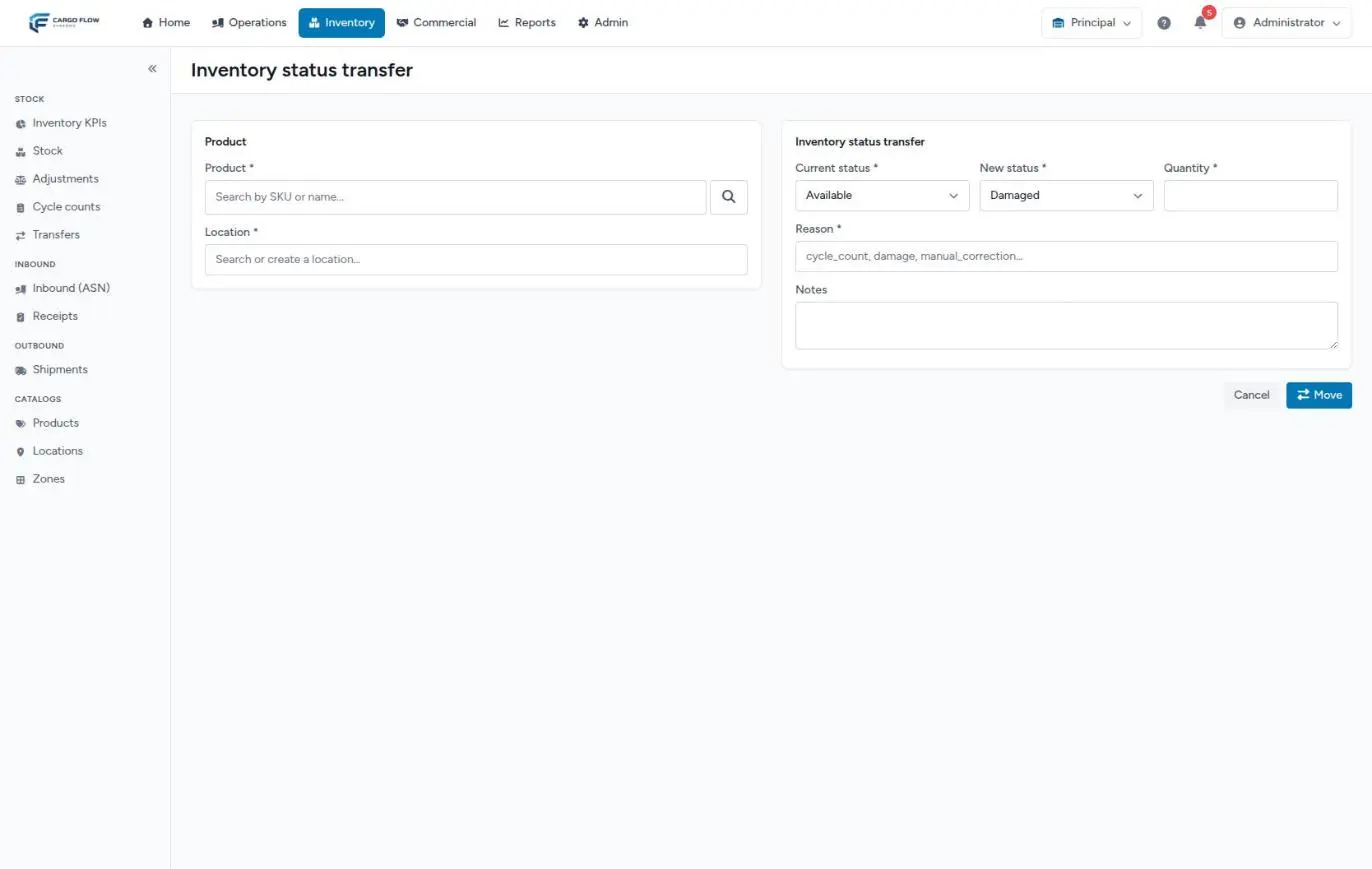
On screen it is called Inventory status transfer (in Stock) or Change Inventory Status (on the dashboard). To see how it fits with every other movement, see The life of stock.
Before you start
- Permission: Adjust Inventory (Super Admin, Admin and Supervisor).
- Module: Inventory enabled for the warehouse.
- The line must exist: the product must have stock in that location (and with that lot). You cannot change the status of goods that are not recorded.
- To see each line’s breakdown, use Stock on a wide screen: that is where every state column shows.
The states, one by one
Each line has a total quantity and eight boxes that are parts of that total. Whatever is in none of them is Available.
| State | What it is for | What fills it and what empties it |
|---|---|---|
| Available | Free to reserve, ship and transfer. | Not stored separately: it is the total minus every other box. It rises with each confirmed receipt and each positive adjustment; everything else lowers it. |
| Reserved | Set aside by a shipment that already reserved. | Filled by a shipment’s or a cross-dock’s reservation. Emptied by closing the shipment (which also lowers the total) or by releasing its allocation, sending it back or cancelling it. See The shipment flow. |
| On hold | Held by an instruction: from the customer, customs, an unpaid balance. | Only by hand, with a status change. |
| Damaged | Damaged, waiting for the customer’s decision. | Filled by the damaged quantity captured on a receipt when it is confirmed, and by status changes. Corrected by editing or cancelling that receipt. Emptied by hand. |
| Quarantine | Isolated because of suspected pests, contamination or a health issue. | Only by hand. |
| In transit | Moving internally within the warehouse. | Only by hand. Transfers do not use it: a warehouse-to-warehouse transfer on the way is in no line at all. |
| Quality Inspection | Waiting for inspection before release. | Only by hand. |
| Returned Goods | Returns waiting to be sorted. | Only by hand. No returns process fills it automatically. |
| Awaiting Disposal | Approved for destruction, waiting for it. | Only by hand; removing it from inventory also needs an adjustment (see the FAQ). |
What a state blocks and what it does not
| Operation | Goods in any state other than Available |
|---|---|
| Reserving for a shipment | Blocked. Only available goods are reserved. |
| Transferring to another location or warehouse | Blocked. Only available goods are transferred. |
| Adjusting down | The line cannot drop below reserved plus blocked. |
| Cycle count | Counted. The task takes the line total, whatever the state. |
| Storage | Charged. The nightly charge counts the line total, damaged or quarantined goods included. |
| Low stock | Not counted as available; it can make a SKU show as low. |
| Customer inventory report | Its available column subtracts it. |
| Client portal | Today it does not subtract it: the customer sees it as available (see the note below). |
Step by step
- Select the line — in Stock tick the line’s checkbox and click Inventory status transfer. The form arrives with the chosen line (product, location and lot) and its Current status breakdown. With no line selected it opens blank and you have to search the product and location (active locations only); blank, it works on the line without a lot.
- Current status (required) — the state the goods leave. From a line, the state holding the most goods is preselected.
- New status (required) — the state they go to. It must differ from the current one. Leaving Available, Damaged is proposed; leaving any other, Available is proposed.
- Quantity (required) — how much to move, above zero and not more than the source state holds. Decimals are accepted.
- Reason (required) — short free text, up to 64 characters: for example “damaged on receipt” or “customer hold”. It is what the history will show.
- Notes — the details, up to 500 characters.
- Move — you return to Stock with the line updated and the message “State transition recorded.”
What happens next
- The new state’s column goes up, the source state’s column goes down, and Available is recalculated. The line total (Quantity) does not change.
- A Status change movement is recorded in the line history, with the reason, notes and user. It does not appear in the adjustments history.
- New shipments can no longer reserve those goods; shipments already reserved are not touched.
- The inventory dashboard moves the units between its state boxes.
- No notification is sent and no charge is created.
Example: damaged goods from start to finish
- Receipt: 200 pieces of
SL-VAS-12arrive for Southern Logistics; the operator captures 12 damaged. On confirmation the line has 200 total, 12 in Damaged and 188 available. - Review: the customer asks for an inspection. You move 12 from Damaged to Quality Inspection with the reason “inspection requested”.
- Decision: 8 are repaired. You move 8 from Quality Inspection to Available (reason “repaired”). The other 4 are approved for destruction: you move them to Awaiting Disposal.
- Destruction: on the day they are destroyed, you move the 4 from Awaiting Disposal to Available and right away record a −4 adjustment with reason Damaged and the destruction certificate number in the notes. The line ends at 196, all available.
While they were in the warehouse, all 12 kept counting in the customer’s storage.
Special cases and limits
- One line at a time, and one pair of states per movement.
- It does not reduce the total. Taking goods out of inventory needs an adjustment.
- It does not change location. If damaged goods are taken to a physical quarantine area, transfer first (while the goods are still available) and then change the status on the destination line.
- Between the change and the adjustment, goods you return to Available to dispose of can be reserved by a shipment. Do both steps back to back.
Best practices
- Mark damaged goods as soon as you spot them: that way nobody promises them on a shipment.
- Use short, consistent reasons across the team; details go in the notes.
- When the customer decides, return the goods to Available or remove them with an adjustment; do not leave them in a blocked state indefinitely: they keep being charged and taking space.
- Check each week on the inventory dashboard how much sits in each blocked state.
Troubleshooting
A message like Cannot move 5 from 'damaged': only 2 available.
- The source state does not hold that much. Check the line’s breakdown and lower the quantity.
The message No stock row exists for that product+location.
- There is no stock of that product in that location (or without a lot, if you opened the form blank). Start from the line’s checkbox in Stock.
The new status is not accepted.
- It must differ from the current status.
Blocked goods still appear as available to the customer.
- That is how the portal calculates (see the note above). Tell them directly.
I do not see the status change button.
- You are missing the Adjust Inventory permission.
Frequently asked questions
How do I remove disposed goods from inventory?
A status change does not reduce the total. When the goods are destroyed, first move them from Awaiting Disposal back to Available, then record a negative adjustment with the right reason; if you leave them in a blocked state, the adjustment cannot bring the line below that quantity.
Should I use the Reserved state?
No. Reservations are created and released by shipments. Moving it by hand from this screen leaves the reservation detached from any shipment: the shipment would still believe its goods are set aside. To release a reservation, work on the shipment (see Cancelling or reverting a shipment).
Does the customer find out about a status change?
Not automatically: no email or notification is sent, and their portal does not show states. The customer inventory report does subtract blocked goods from available. Tell them yourself.
Need help?
If something did not work as expected, our support team can help you.
Was this article helpful?