Lots, serial numbers and expiry
Overview
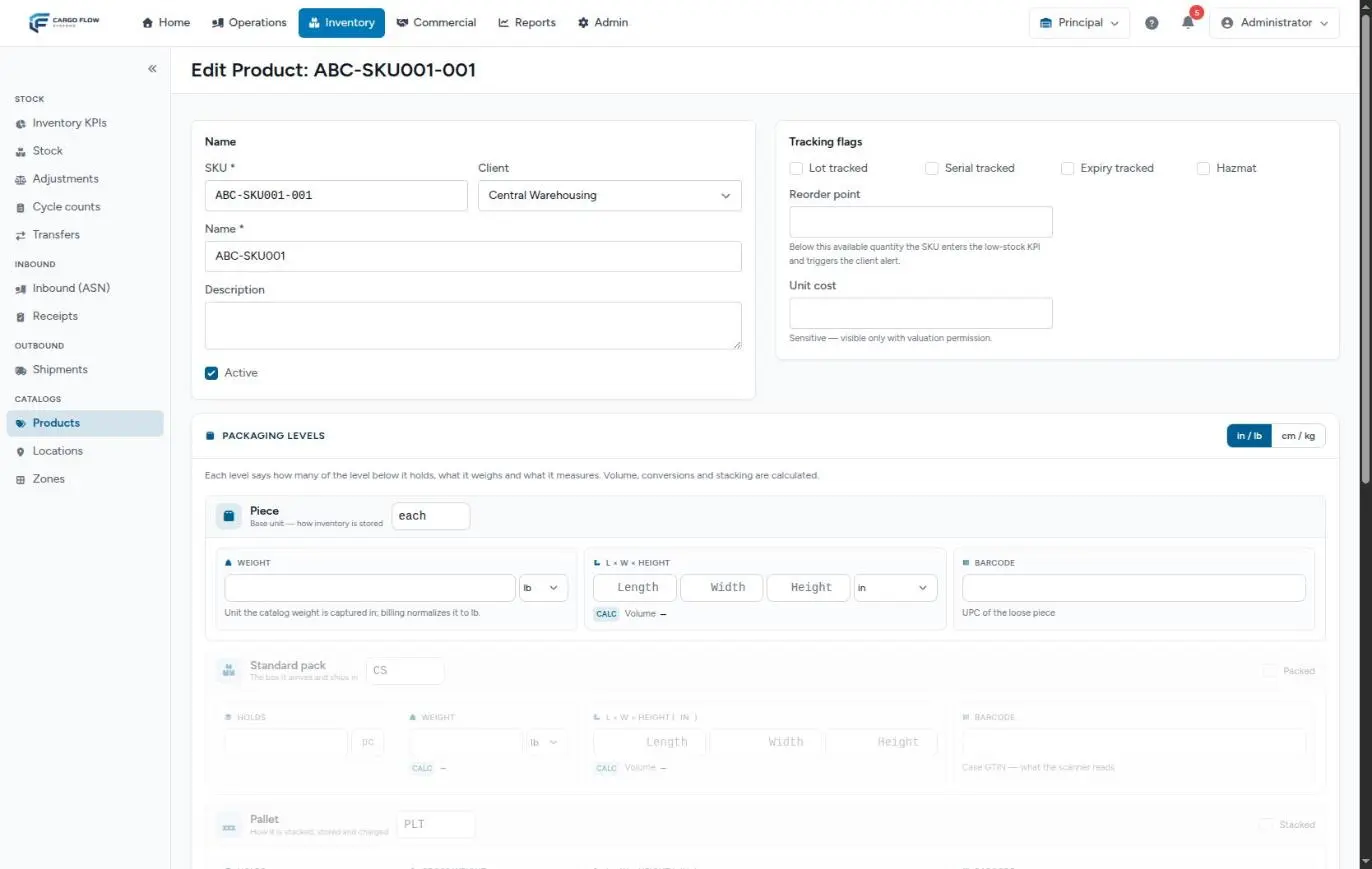
Every product has four tracking flags: Lot tracked, Serial tracked, Expiry tracked and Hazmat. They are ticked on the product and tell the system how much detail to ask for about those goods.
Today only Lot tracked changes operations: the receipt requires the lot number and stock is kept separate per lot. The other three are saved with the product, but there are no screens yet that capture expiry dates or serial numbers. This article explains exactly what each one does, so you do not promise the customer a control the system does not apply yet.
Before you start
- Ticking the flags: Manage Inventory Catalogs (Super Admin and Admin), under Inventory › Products. They can also be loaded with the CSV import.
- Capturing the lot: whoever captures the receipt (receipt capture permission) and whoever confirms it.
- Module: the lot is required only when the warehouse has Inventory; without it, the receipt is only a record and no goods are put away.
What each flag does today
| Flag | What it does today | What it does not do |
|---|---|---|
| Lot tracked | The receipt asks for each line’s lot and will not confirm without it. Stock splits into one line per lot. Shipments reserve lot by lot. | It does not ask for the lot on shipments or let you choose which lot leaves. |
| Expiry tracked | Saved with the product. | No screen asks for the expiry date; without a date there is no expiry order, no blocking of expired goods and no alerts. |
| Serial tracked | Saved with the product. | Serial numbers are not asked for or stored at any step. |
| Hazmat | Saved with the product. | It does not change receipts, shipments, locations or documents. |
Capturing the lot at receiving
- Add the line to the receipt — by scanning or searching the product during capture (see Capturing lines).
- Open the line’s lot — on lot-tracked products, the line shows a lot button marked with an asterisk. Opening it shows the Lot # field.
- Type the lot number — exactly as printed on the case or in the supplier’s paperwork, up to 64 characters. It is free text:
L2609-A,240915, whatever the label says. - If the truck brings two lots of the same SKU, capture two lines, one per lot, each with its quantity.
- Send for review and confirm — on confirmation the system creates the lot (or reuses an existing one with the same number for that product) and puts the goods on its line.
If a line with a received quantity has no lot, confirmation stops with: “Enter the lot number for product — this product is lot-tracked. Use "Edit capture" to set it.” Lines that arrived at zero (all short) do not require it.
How stock is split by lot
- A stock line is product + location + lot. 100 pieces of lot A and 50 of lot B in the same location are two lines.
- A second receipt of the same lot in the same location adds to the existing line.
- Adjustments and status changes opened from the line (pencil or checkbox) carry the line’s lot. Opened blank, they work on the line without a lot.
- Transfers ask for the Lot ID, which is the lot’s internal number, not the printed one. See Stock transfers.
- Cycle counts create one task per line, so each lot is counted separately and its number shows next to the location.
In what order lots leave
When a shipment reserves, the system walks the product’s lines in this order:
- First the lot that expires first; lines with no expiry date go last.
- Among lines without a date (or with the same one), the line created first goes first (first in, first out).
- Lines whose lot has already expired are skipped.
Since lots have no expiry dates today, in practice the order is arrival order. Only what is available in locations that are active, pickable and not staging areas is taken. See The shipment flow.
Expiry: what exists and what is missing
The system already has the pieces that use a lot’s expiry date:
- Expiry-first order and skipping expired lots when reserving.
- A daily check (at 4:00) that looks for lots with stock expiring in 30, 60 or 90 days, or already expired, and leaves a notification in the bell for the warehouse’s active users.
- The Expiring soon (lots expiring in 30 days or less) and Expired KPIs on the KPI dashboard (see Building the KPI dashboard).
- The inventory API returns each lot’s expiry date (see Connecting through the API).
Serial numbers and hazmat
- Serial tracked: the stock structure already has room for a serial number per line, but no step asks for it. Operations (reservation, transfer) ignore lines with a serial today, which in practice do not exist.
- Hazmat: an informational flag. If the customer handles dangerous goods, say so in the product name or description as well, which do show during capture and on documents.
Where the lot shows
| Place | What it shows |
|---|---|
| Receipt review | A tag with the lot number on each line. |
| Stock | No lot column; the line links to its receipt and to its history filtered by lot. |
| Shipment detail | The pull list (the locations goods will be pulled from) shows the lot of each reserved row. |
| Cycle count | The lot number next to each task’s location. |
| Customer inventory report | A lot column (see the note below). |
| Inventory API | Lot number and expiry date. |
| Client portal | No lots; it adds up by SKU. |
Example: three lots of the same SKU
Valley Distributors receives its syrup DV-JAR-750 (Lot tracked):
- September 2: receipt with 300 pieces of lot
L-0826inA-02-1-1. - September 9: receipt with 200 pieces of lot
L-0903inA-02-1-1and 100 pieces of lotL-0826inA-02-1-2.
Stock shows three lines: 300 (L-0826, A-02-1-1), 200 (L-0903, A-02-1-1) and 100 (L-0826, A-02-1-2). On September 15 a shipment for 350 pieces arrives. With no expiry dates, the reservation follows the order in which lines were created: it takes the 300 from the September 2 line and the remaining 50 from the first line created on September 9 (depending on the order its rows were confirmed). The shipment detail shows which location and lot each part comes from, and that is what the operator pulls at loading.
Special cases and limits
- You cannot choose the outgoing lot, neither on the shipment nor from the portal.
- Fixing a mistyped lot: edit the confirmed receipt (see Cancelling or correcting a receipt); the system corrects stock with automatic adjustments that stay in the history.
- One-time items are born with no flags; they do not ask for a lot.
- Stock from before the flag: it stays without a lot and keeps shipping normally.
Best practices
- Tick Lot tracked before the product’s first receipt.
- Capture the lot exactly as printed; capitals, dashes and zeros matter.
- Do not tick Expiry tracked or Serial tracked expecting the system to control them: today it does not. If you tick them, treat them as a reference only.
- When a lot must be held (manufacturer recall, claim), block its lines with a status change to On hold or Quarantine.
Troubleshooting
The receipt will not confirm and asks for the lot number.
- A line of a lot-tracked product has a received quantity and no lot. Use Edit capture, open the line’s lot and type it.
The lot field does not appear on the line.
- The product does not have Lot tracked. Tick it on the product and reopen the capture.
The shipment took the new lot and not the old one.
- Reservation follows the line’s creation order, not the lot number. If the old lot was in a non-pickable location or blocked in a state, it was skipped.
The expiry KPIs always show zero.
- Lots have no expiry date because it is not captured today. See the expiry section.
Notifications with no title appear in the bell.
- It may be the expiring lots notification; today the bell does not give it a title. It is only created when some lot has an expiry date.
Frequently asked questions
Can the customer ask for a specific lot to ship?
Not in the system. If they need it, block the other lots with a status change while that shipment reserves, and return them to available afterwards.
What happens if I tick “Lot tracked” when there is already stock?
Current stock stays without a lot and keeps shipping normally. From the next receipt on, every line asks for a lot.
Can two products have the same lot number?
Yes. A lot is unique per product: lot L-0826 of one SKU and L-0826 of another are different lots.
Need help?
If something did not work as expected, our support team can help you.
Was this article helpful?