Customer rates
Summary
Each warehouse has a service catalog with base prices. A customer’s Pricing tab is where you give that customer a different price, decide when a service is charged to it and, if needed, create a service that exists only for it.
The underlying rule is simple: if the customer has its own rate, that rate wins; otherwise the catalog base price is charged. How the catalog is built is in The service catalog and how charges are calculated in Rate card and prices; here we focus on the tab.
Before you start
- Permission: Configure Clients to enter rates (Admin and Superadmin). Creating an exclusive service also requires Manage Pricing, which Admin and Superadmin also have.
- Module: rates only produce charges if the warehouse has the billing module.
- The warehouse catalog: the tab lists the active services of the catalog of the warehouse selected at the top. An empty catalog leaves nothing to negotiate: build the catalog first.
- The quote: if the customer came from a won quote, its rates are already loaded; review them before entering others.
How to read the tab
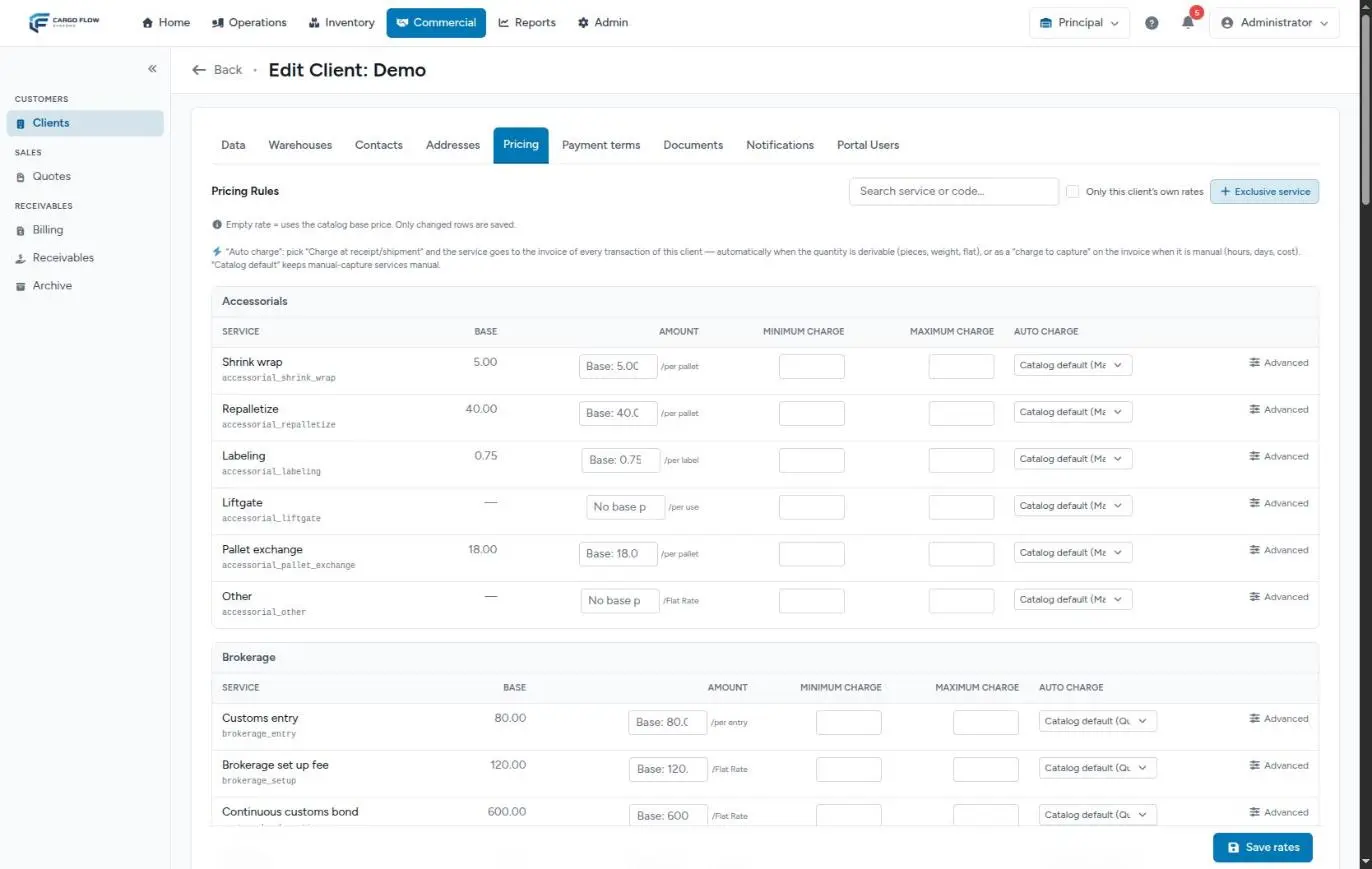
Services are grouped by category (Accessorials, Customs brokerage, Storage…). Each row has:
| Column | What it is |
|---|---|
| Service | The name and, below it, its code. Services with their own rate carry the Negotiated badge; exclusive ones, a padlock. |
| Base | The warehouse catalog price. A dash means the catalog has no price for that service. |
| Amount | This customer’s rate. Empty (grey «Base: …») = the base price is charged. Next to it, the unit: per pallet, per carton, per piece, per weight, per hour, per day, flat rate… |
| Minimum / Maximum charge | Optional floor and ceiling of the charge, for example a monthly storage minimum. Applied on the invoice as an adjustment line. |
| Auto-charge | When the service is charged to this customer (see below). |
| Advanced | Opens currency, validity, notes and the button to go back to the base price. |
At the top there is a search by name or code, the Only this client’s own rates checkbox (hides what is charged at base price) and the Exclusive service button. Rates of services no longer in the catalog appear in a separate card at the end, «Other / Custom».
Negotiate a price
- Find the service with the search or browse the category.
- Type the agreed amount in Amount (up to 4 decimals). The row is marked as changed.
- If needed, enter minimum and maximum.
- Click «Save rates», the fixed button at the bottom right. Only the rows you touched are saved; you can change several and save once. You see «Rates saved».
Services charged at cost have no amount: they show «Billed at cost» and the amount is entered on each charge. For cost plus percentage services, a negotiated flat rate replaces the calculation («A negotiated flat rate replaces cost + %»).
If you clear the amount, minimum, maximum and auto-charge of a row and save, the customer’s own rate disappears and the service goes back to the base price.
When each service is charged
The Auto-charge column decides when the service is added to the customer’s account:
| Option | What it does |
|---|---|
| Catalog default (first option; in brackets it shows the catalog’s timing) | Follows the warehouse catalog. Manually captured services stay manual. |
| Charge at receipt | The service is added for every confirmed receipt of this customer. |
| Charge at shipment | The service is added for every closed shipment of this customer. |
When the quantity can be worked out automatically (pieces, pallets, weight, flat rate), the charge is created automatically. When it cannot (hours, days, cost), it appears on the invoice as a charge to capture that someone in billing completes.
Storage and free days
Storage is different: it has no «at receipt», because it is charged by time. Its options are:
- Daily (accrual): every night at 2:00 one storage day is accrued for whatever the customer has in stock.
- Charge at shipment: when goods leave, the calendar days from entry to shipment are charged, minus free days.
- Do NOT charge storage: the customer is not charged storage.
Per-day storage services also show Free Days: the first days that are not charged.
Advanced options
The Advanced button on each row opens:
- Currency: among the currencies enabled in the warehouse. Charges in different currencies never go on the same invoice.
- Effective From / Effective To: for a rate with a start or end date. The end date cannot be before the start date. Outside that window the base price is charged.
- Notes / quote reference: where the price came from.
- Reset to base: removes the customer’s own rate; on save the service goes back to the catalog price.
A service exclusive to the customer
If you do something for a customer that is not in the catalog, click Exclusive service:
- Service name (required, up to 120 characters).
- Type: Service or Accessorial.
- Rate basis: the unit (per pallet, per piece, flat rate…).
- Amount (required, 0 or more) and, optionally, Minimum Charge and Maximum Charge.
- Click «Create service». You see «Exclusive service “…” created with its rate».
The service goes into the warehouse catalog marked as exclusive, in the currency of the customer’s payment terms, and exists only for it: it does not appear in other customers’ catalog or in new quotes. It starts as a manually captured service; if you want it charged automatically, change its Auto-charge.
If the button returns a permission error, you are missing Manage Pricing.
If your warehouse uses the new rate card
Some warehouses have the new billing engine switched on. There the tab looks different and is titled Rate card: instead of the whole catalog, it shows only the services the customer has contracted.
- With no services it reads «This client has no custom rates» and explains that everything is charged at base price, except handling, which is only charged if you add it.
- Add services opens the catalog with a search to choose what it contracts; Add selected adds them. Each line starts with the base price and the catalog’s charge timing.
- Each line has its Rate (empty = base price) and its When is it charged?: when receiving, when shipping, when a job is completed, manual capture or Do not charge (excluded); for storage: storage days charged when shipping, accrued daily, or do not charge.
- Each line is saved with its own Save button.
- Remove takes the line off the rate card and back to the base price. If what you want is not to charge it, do not remove it: pick «Do not charge (excluded)».
What happens next: from rate to invoice
- When a receipt is confirmed or a shipment closed for the customer, auto-charged services create their charges with the rate in force that day.
- Every night daily storage is accrued and, at 2:30, pending charges are grouped into invoices according to the customer’s payment terms.
- Accessorials recorded by operators on a receipt, shipment or job use the customer’s rate. See Record an accessorial.
- A charge with no rate (neither own nor base) waits for attention in the unbilled pool until someone resolves it. See How charges are created.
The full journey is in Where each charge comes from.
Example: Central Warehousing
The warehouse catalog charges 25.00 per pallet for receiving handling and 0.60 per pallet per day for storage. With Central Warehousing it was agreed:
- Receiving handling at 20.00 per pallet, Auto-charge «Charge at receipt».
- Storage at 0.50 per pallet per day, «Charge at shipment», with 5 free days and a minimum charge of 150.00.
A 12-pallet receipt arrives on 1 September: confirming it creates a charge of 12 × 20.00 = 240.00. The 12 pallets leave on 21 September: 20 calendar days minus 5 free, 15 days × 12 pallets × 0.50 = 90.00; since the minimum is 150.00, the invoice adds a 60.00 adjustment line.
Special cases and limits
- Price with a change date: enter the new rate with «Effective From»; until that date the previous one (or the base) is charged.
- Service inactive in the catalog: not offered for negotiation; its old rates stay in the «Other / Custom» card.
- Rates and warehouses: the tab shows the catalog of the warehouse selected at the top; make sure it is the customer’s warehouse.
- Charges already created: a new rate does not recalculate them. Correct them on the invoice.
- Minimum and maximum for daily storage: they only apply to customers with «Monthly» payment terms, once a month. For a customer billed per operation, the floor and ceiling of daily-accrual storage are not applied; those of storage charged at shipment are, on each shipment’s invoice.
Messages you may see
| Message | What to do |
|---|---|
| «Rates saved» | Nothing: the changed rows were saved. |
| «The maximum charge cannot be below the minimum charge.» | Fix that row or leave the maximum empty. |
| «The end date must be on or after the start date.» | Check the validity under Advanced. |
| «A 0 does NOT mean free…» | A warning, not an error. Use the no-charge option if you mean free. |
| Permission error when creating an exclusive service | Ask for the Manage Pricing permission. |
Best practices
- Use Only this client’s own rates to review at a glance what the customer has negotiated.
- Write the quote or contract number behind each price in Notes.
- For a dated increase, use the validity instead of changing the price on the exact day.
- Do not use 0 for «free»; use the no-charge option.
- After negotiating, check the customer’s first invoice against what was agreed.
Troubleshooting
I set a service to 0 and it was still charged.
- As expected: 0 falls back to the base price. Use the no-charge option.
I cannot find a service that is in the catalog.
- Untick Only this client’s own rates and clear the search. Inactive catalog services are not offered.
The service was not charged when the receipt was confirmed.
- Is its Auto-charge «Charge at receipt», or does the catalog say so?
- Can its quantity be worked out automatically? If it is hourly or at cost, it became a charge to capture on the invoice.
- Does the warehouse have the billing module?
The invoice used the old price.
- Charges take the rate in force on the day they are created. If they were created before the change, correct them on the invoice.
Frequently asked questions
How do I charge a customer nothing?
For storage, choose the no-charge option in Auto-charge. On the new rate card, use Do not charge (excluded) on any service. Typing 0 in the amount does not work.
Does a rate change affect charges already created?
No. The rate applies to charges created afterwards. Existing charges keep their amount; to correct them, edit the invoice. See Edit and correct invoices.
Where do the rates of a brand-new customer come from?
From the won quote: each enabled quote line becomes a customer rate, with a note pointing to the source quote. Extra lines that were not in the catalog are created as services exclusive to the customer.
Need help?
If something did not work as expected, our support team can help you.
Was this article helpful?