Visit types and their kiosk flow
Summary
A visit type defines a flow: what the person is asked, whether they need a host, whether a photo is taken, whether it can be invited, how long it lasts and what message they see at the end. Every visitor comes in with a type. Types are set up in Visitor settings, Visit types tab, with the Configure Visits permission (admin).
The type list
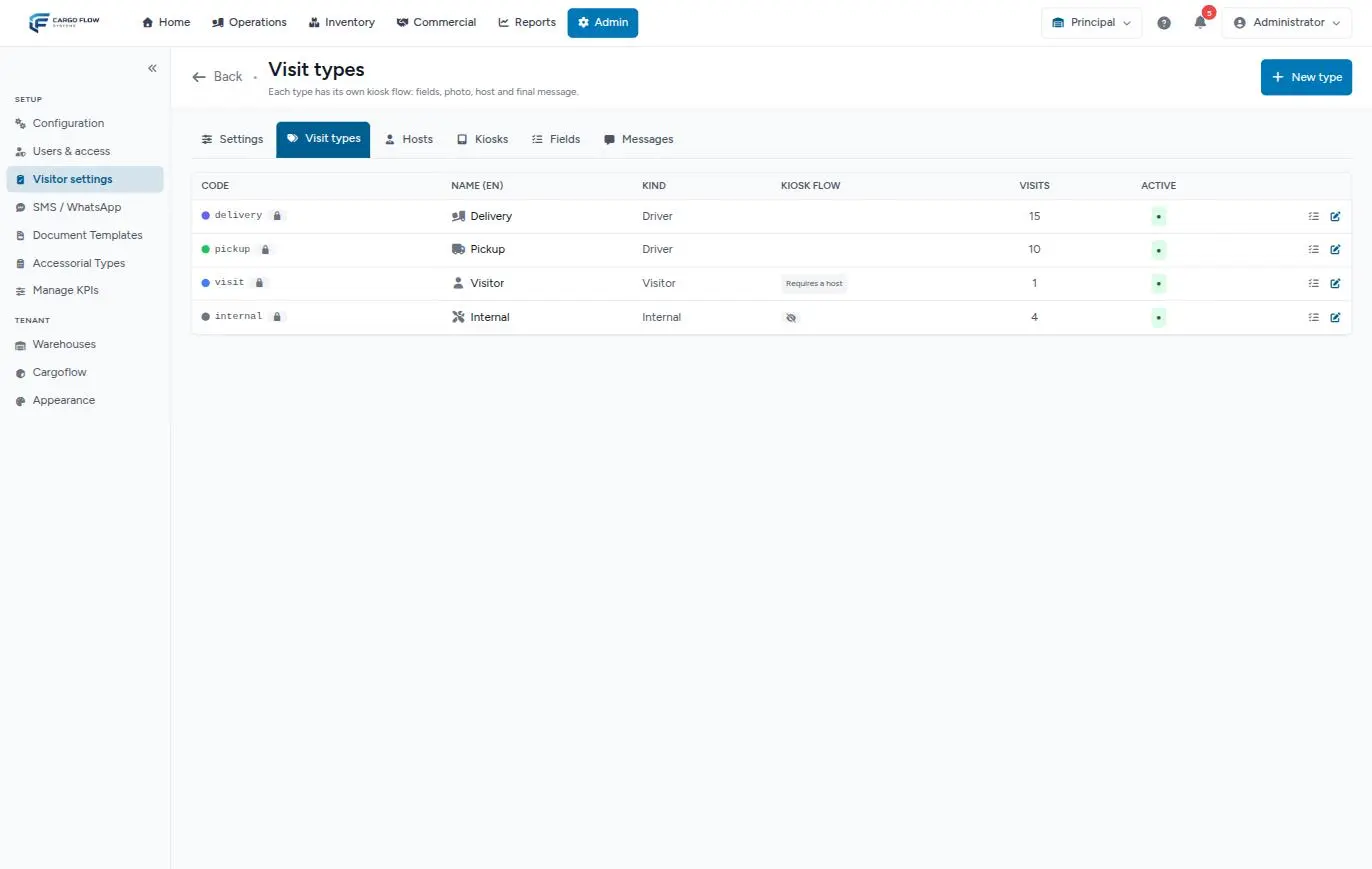
Each row shows the code (with a dot in its color and a lock if reserved), the name, the kind, the Kiosk flow (chips like "Requires a host", "Take a photo", "Needs approval" or a crossed-out eye if not shown on the kiosk), how many visits it has and whether it is active. On the right: Configure fields (opens the Fields tab for that type), edit and, if not reserved, delete.
The column header says "Name (EN)", but it shows the name in your screen language.
The four reserved types
| Type | Code | Kind | By default |
|---|---|---|---|
| Delivery | delivery | Driver | Leads to the driver kiosk. |
| Pickup | pickup | Driver | Leads to the driver kiosk. |
| Visitor | visit | Visitor | Requires a host. |
| Internal | internal | Internal | Not shown on the kiosk. |
They exist in every warehouse with visitors. They cannot be deleted or change their code or kind: "Reserved visit types cannot change their code or kind, nor be deleted." You can change their name, color, icon, flow checkboxes, and deactivate them.
Creating or editing a type
- Tap New type (or the pencil on an existing one).
- Fill in the fields (table below).
- Save: "Visit type created." or "updated".
- If you want your own questions (badge number, license plate), tap Configure fields. See Visitor settings.
- Add it to the kiosks where it should appear (Setting up kiosks).
What each field asks for
| Field | Accepts |
|---|---|
| Code | Required. Lowercase, digits, dash and underscore, up to 64. Unique in the warehouse. Cannot change after creation. |
| Kind | Visitor. Driver and Internal are reserved for the factory types: "Only the reserved Delivery and Pickup types can be of kind "driver"." |
| Name (EN) and Name (ES) | Required, up to 120. What the person sees in their language. |
| Color | Indigo, blue, green, amber, rose, purple, teal or gray. |
| Icon | Optional: an icon class such as fas fa-hard-hat. |
| Description (EN/ES) | Optional, up to 255. Not shown anywhere today. |
| Expected length (minutes) | 5 to 1,440. Empty: the default length from the settings (60). |
| Auto check-out after (hours) | 1 to 72. Only works if general automatic check-out is on. |
| Order | 0 to 999; lower shows first on the kiosk. Default 50. |
| Final message on the kiosk (EN/ES) | Up to 1,000. What the person sees at the end: "Please wait in the lobby; your host is on the way". |
The kiosk flow
| Checkbox | Default | What it does |
|---|---|---|
| Show on the kiosk | On | Shows as a tile on the kiosk. |
| Requires a host | Off | Forces choosing who they visit. |
| Take a photo | Off | Asks for a photo at the kiosk. |
| Ask for company | Off | Company becomes required. |
| Ask for email | Off | Email becomes required. |
| Needs approval before entering | Off | Do not use it: there is no way to approve today (see How visitor management works). |
| Can be pre-registered | On | Shows on the invitation form. |
| Active | On | Inactive, it is offered nowhere. |
Example: the Contractor type
Code contractor, kind Visitor, names "Contractor" and "Contratista", amber, icon fas fa-hard-hat, length 240 minutes, auto check-out at 10 hours, with host, photo and company required, final message "Go to the gate house for your hard hat and vest". On the Fields tab you add "Insurance policy number", required. You check it on the reception kiosk.
Deactivating or deleting
- Deactivate: turn off Active. It is no longer offered at kiosks, reception or invitations; past visits keep their type, but the type no longer shows in the history filter.
- Delete: only your own types that were never used. Asks for confirmation. With visits: "This type already has visits. Deactivate it instead of deleting it."
Troubleshooting
"The slug format is invalid" or "The slug has already been taken".
- The code has capitals, spaces or accents, or already exists. Messages on this form use internal names: slug is the Code, name.en the Name (EN).
Saving with an error closed the window and I lost what I typed.
- That is how it works today: the error shows at the top of the page and you have to open the form and enter it again.
The type does not show on the kiosk.
- Check Show on the kiosk, Active and that the kiosk has it checked.
Frequently asked questions
Where is the type description shown?
Nowhere today: it is stored but no screen shows it. To tell the person something, use the final message.
Need help?
If something did not work as expected, our support team can help you.
Was this article helpful?