Hosts and notifications
Summary
The host is the person the visitor comes to see. They get the arrival notice. They do not need to be a system user: anyone with an email or phone will do. Hosts are managed in Visitor settings, Hosts tab, with the Configure Visits permission (admin).
The host list
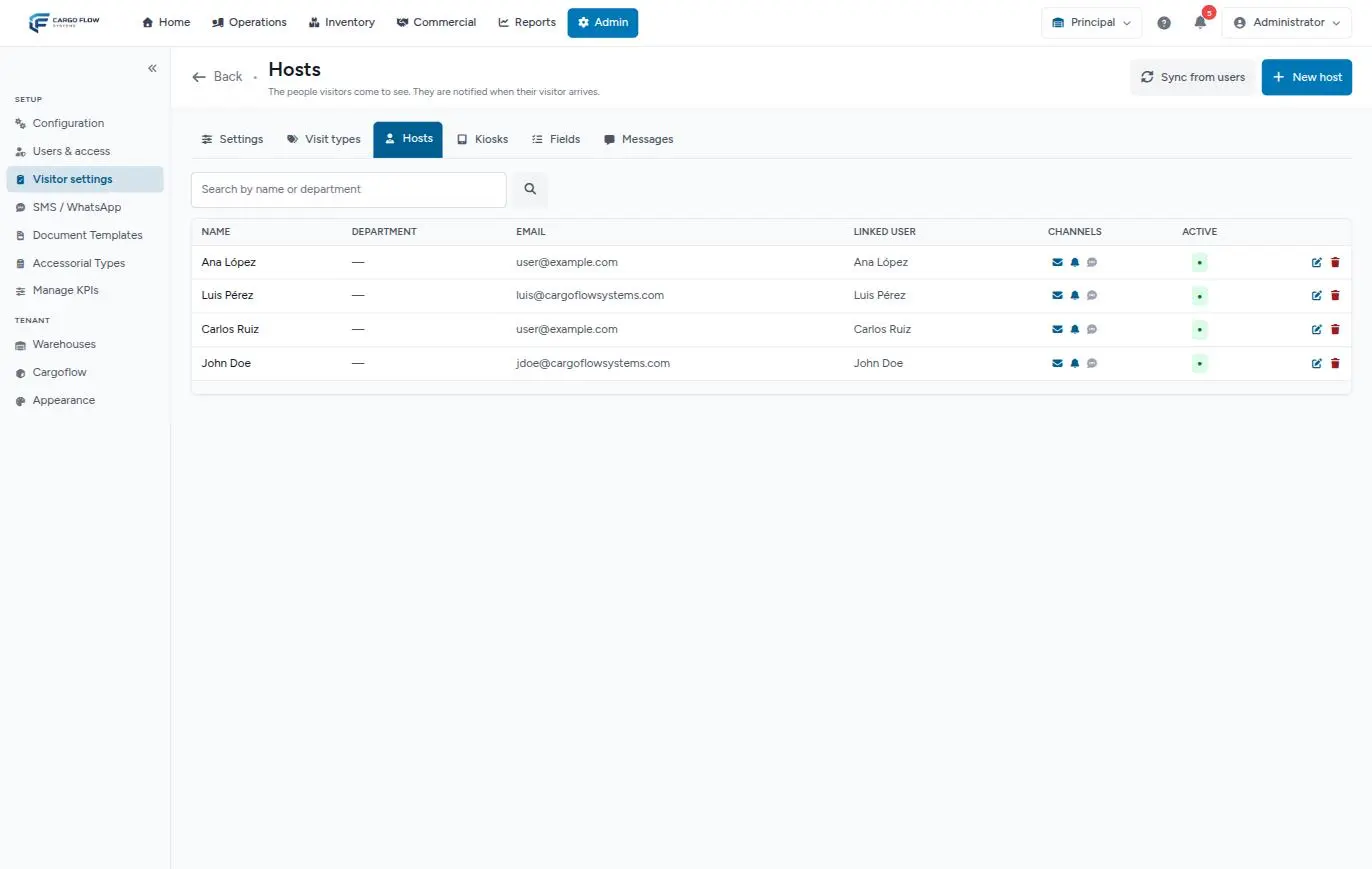
Search by name or department; 50 per page, alphabetical. Columns: name (with a crossed-out eye if hidden from the kiosk), department, email, linked user, channels (envelope, bell, message) and active.
Adding a host
| Field | Accepts |
|---|---|
| Linked user | Optional. An active user of the warehouse. Choosing one fills any empty name, email and language. A linked user also gets the in-app bell. A user can be host only once per warehouse. |
| Name | Required, up to 120. |
| Optional; stored in lowercase. | |
| Phone | Optional, up to 32; write it with country code (+1…): the system does not check the format, but text messages need it. |
| Department | Optional. Shows in the kiosk search, next to the name. |
| Language | English, Spanish or empty. |
| Visible on the kiosk | On: people can pick them. Off: only reception can. |
| Notify by email, in-app, by SMS / WhatsApp | The first two on by default; text messages, off. |
| Active | Inactive: cannot be picked and gets no notifications. |
Sync from users
The button asks for confirmation ("Add every active user of this warehouse as a host? Nothing is deleted.") and does three things:
- Creates a host for every active user of the warehouse who is not one yet, with their name, email and language, visible on the kiosk, with email and bell. It does not copy phone or department. It leaves out the super admin and client portal users.
- Updates existing hosts: it reactivates them if inactive and fills in their email if missing. It does not touch the name.
- Deactivates hosts linked to a user who is no longer active in the warehouse.
When done it says how many it created, updated and deactivated. Hosts with no linked user are never touched.
How the host finds out
When a visitor (not a driver or internal) checks in by any path, the active host gets:
| Channel | When it goes out |
|---|---|
| Notify by email on and the host has an email. | |
| In-app bell | Notify in-app on and the host has a linked user. |
| SMS or WhatsApp | Notify by SMS on, the host has a phone, and the warehouse has the messaging module with the visitor-arrival notice on. See Setting up SMS and WhatsApp. |
The arrival email and its buttons
Subject "[name] has arrived". It carries visitor, company, visit type, arrival time, purpose, visit number and the photo, if one was taken, plus two buttons:
- ✓ I'm on my way — reception sees "On my way" on the board.
- ⏳ Ask them to wait — reception sees "Please wait".
They work without signing in for 12 hours. After tapping one, the host sees "Thanks!" and what reception knows; if the visitor has already left, "Nothing to update". Tapping twice does no harm. The visit history records "Host responded".
Every notification in the module
| Notification | To whom | When |
|---|---|---|
| Your visitor has arrived | Host | On check-in. |
| A visitor has arrived | Reception roles (bell and, if on, email) and extra addresses | On check-in. The host does not get this second notice. |
| Your visitor has left | Host | On check-out, if turned on in the settings. |
| Confirmed / will not attend | Host | When the invitee answers from their page. |
| Invitation, rescheduling, reminder | Visitor | On invite, on resend or edit with resend, and before the appointment. |
| Your arrival was recorded | Visitor (text message) | With phone, consent and the messaging module. |
Each notification is logged in the Notifications tab of the visit detail, with channel, recipient and whether it failed. Cancelling or marking no-show from reception does not notify anyone.
Deactivating or deleting
- An inactive host does not show on the kiosk, at reception, in invitations or in the history filter, and stops getting notifications, also for visits already scheduled with them. Reassign those visits before deactivating.
- Deleting asks for confirmation and is only possible with no visits: "This host has visits on record. Deactivate them instead of deleting."
Troubleshooting
"The user id has already been taken."
- That user is already a host in this warehouse. Look them up in the list.
"The selected user id is invalid."
- The user is not active in this warehouse.
The host gets no emails.
- Check that they are active, have an email and the envelope icon is lit. Check the visit's Notifications tab.
Frequently asked questions
Which language is the notice in?
The host's language; if none, their linked user's; if none either, the warehouse notification language.
Need help?
If something did not work as expected, our support team can help you.
Was this article helpful?