Reorder point and low stock
Overview
The reorder point is the minimum quantity a customer wants to keep available of a product. When the available quantity drops below it, the SKU counts as low stock. It helps the customer replenish on time and tells the warehouse which products will run short on shipments.
The value lives on each product. From it, the system calculates the low stock KPI on the KPI dashboard and runs a check every morning.
Before you start
- Entering the reorder point: Manage Inventory Catalogs (Super Admin and Admin), under Inventory › Products.
- Creating the KPI: the permission to manage KPIs (Super Admin and Admin), under Admin › Manage KPIs.
- Module: Inventory enabled for the warehouse; the daily check skips warehouses without it.
- Ask the customer for their minimums per SKU: the reorder point is their decision, not the warehouse’s.
Setting the reorder point
- Open the product — Inventory › Products, the SKU’s pencil.
- Reorder point — type the minimum quantity in base unit (pieces, if the product lives in pieces), zero or more, up to four decimals. If the customer gives the minimum in cases or pallets, convert it with the product’s Equivalences.
- Save — the change counts from the next calculation.
Leaving it empty means “this product is never low”. A zero triggers nothing either, because available is never below zero.
How “low” is calculated
For each product with a reorder point, the system adds up the available quantity of all its lines in the warehouse (every location and lot) and compares:
- Available is the quantity minus what shipments reserved and minus every blocked state (on hold, damaged, quarantine, etc.). See Changing the status of goods.
- If available is strictly lower than the reorder point, the SKU is low. Equal to the reorder point is not low.
- A product with a reorder point and no stock counts as low (zero is below the point).
- Inactive products and one-time items that have a reorder point count too.
The daily check and who it notifies
Every day at 5:00 an operational alerts check runs (the same one that looks for late shipments). For low stock it does this:
- It calculates the low SKUs of each active warehouse with Inventory.
- It groups them by customer and sends a live event on the warehouse’s inventory channel.
- If the customer has the low stock alert enabled in its notification settings, it leaves a notification for its portal users with up to ten SKUs, their available quantity and their reorder point.
Showing it on the KPI dashboard
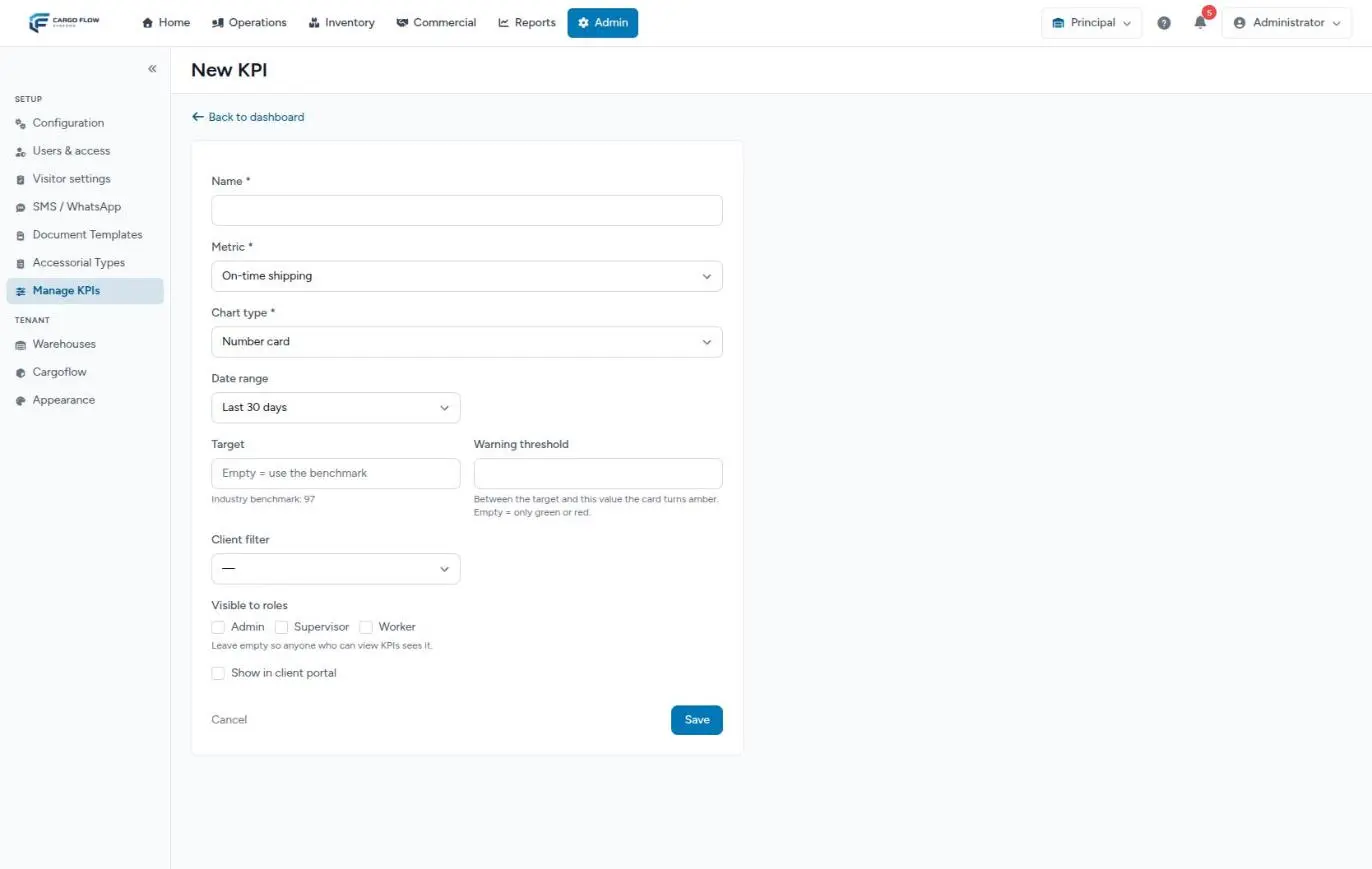
- Open Admin › Manage KPIs and create a new KPI.
- Name — for example “SKUs below minimum”.
- Metric — choose Low stock (in the inventory group). It counts how many SKUs are below their reorder point right now; it does not use a date range.
- Client filter — for a per-customer KPI.
- Show in client portal — tick it so the customer sees it in their portal.
- Save.
The KPI tells you how many SKUs are low, not which ones. To see which, filter Stock by the customer and compare the Available column with each product’s reorder point. More in Building the KPI dashboard.
Example
Sample Imports asks for a minimum of 5 cases of 24 pieces for its SKU IE-CAF-250. You enter 120 as the reorder point (5 × 24). Today the warehouse has:
| Location | Quantity | Reserved | Damaged | Available |
|---|---|---|---|---|
| A-05-2-1 | 96 | 24 | 0 | 72 |
| B-01-1-3 | 60 | 0 | 12 | 48 |
There are 156 pieces physically, but only 120 available. Since 120 is not below 120, the SKU is not low. If another shipment of 24 reserves tomorrow, available drops to 96 and the KPI counts it.
Special cases and limits
- One number per product: there are no maximums, suggested replenishment quantities or seasonal points.
- Global products: calculated the same way, but they belong to no customer, so no portal would see them.
- Goods on the way: pending ASNs do not add to available; a SKU can be low even if the truck arrives tomorrow.
- Retired products: if you deactivate a product and leave its reorder point, it keeps counting as low. Clear the field when retiring the product.
Best practices
- Enter the reorder point in base unit and note in the product description how the customer asked for it (“5 cases”).
- Review it with the customer every quarter: minimums change with the season.
- Put the KPI in the customer’s portal so they watch their own replenishment.
- Release blocked goods in time: damaged or quarantined goods do not count as available and can trigger low stock that is not real.
Troubleshooting
The KPI flags low SKUs that have plenty of goods.
- Those goods are reserved or blocked. Check the state columns in Stock.
- Check the reorder point is in base unit and not in cases or pallets.
The KPI always shows zero.
- No product has a reorder point, or the warehouse does not have the Inventory module.
The customer never got a low stock alert.
- Today the alert is not delivered (see the daily check note). Show them the KPI in their portal.
A product no longer handled keeps showing as low.
- It has a reorder point. Clear the field.
Frequently asked questions
Is the reorder point per warehouse?
Yes. Each warehouse has its own catalog, so the same customer SKU in two warehouses has two reorder points, each compared with its own warehouse’s stock.
Does the system order goods when something is low?
No. The warehouse holds the goods; buying and replenishing are the customer’s. The system only flags what is low.
Need help?
If something did not work as expected, our support team can help you.
Was this article helpful?