Audit log: who changed what
Overview
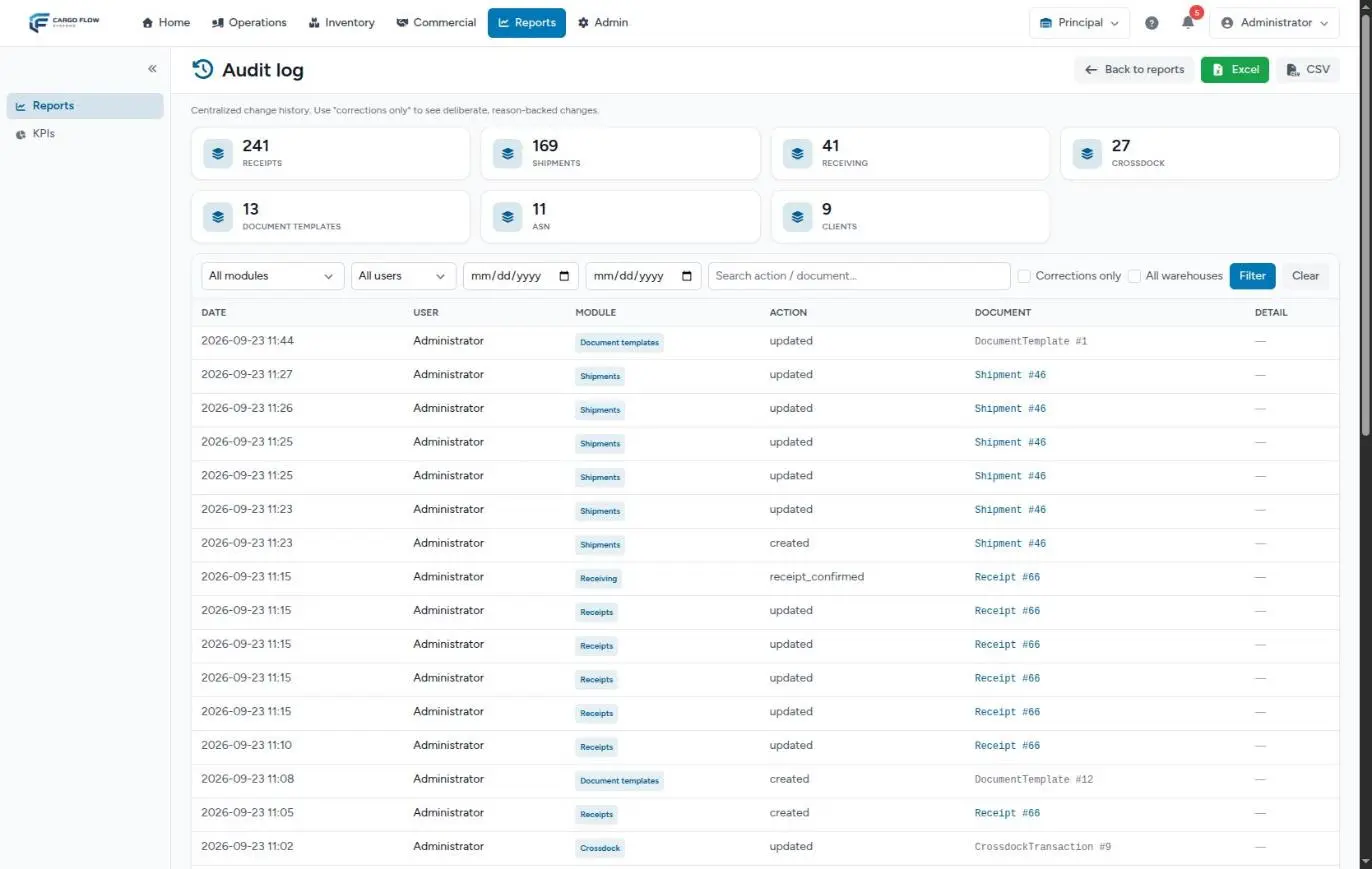
The Audit log is the central change history: every creation, edit and confirmation of receipts, shipments, ASNs, cross-docks, customers, document templates and identity corrections, with who did it, when and, for corrections, why.
Before you start
- Module: none; it exists in every warehouse.
- Permissions: Read Audit Reports to view it and Export Audit Reports for the download buttons to appear. By default admin and super admin have both.
- Where: Reports › Audit log › View Report.
Counts by module
At the top, one card per module with its number of changes, highest first. The modules are: identity corrections, receipts, receiving, shipments, customers, ASN, document templates, cross-dock and other. The counts cover the whole warehouse (or all of them, see below) and do not change with the other filters. Clicking a card filters the table by that module.
The filters
- Module and user — the user list only includes people who appear in the log.
- Two dates, from and to.
- Search — matches the action text, the document type or the exact internal document number.
- Corrections only — keeps only changes that carry a written reason, such as correcting an already confirmed receipt. It is the first thing to review in an audit.
- All warehouses — super admin only; everyone else sees the active warehouse.
Click Filter; Clear removes them. Filters stay in the page address.
The table and the detail
40 entries per page, newest first. Columns: date, user, module, action, document and detail.
- Document shows the type and internal number, for example "Receipt #12". It is a link only for receipts and shipments that still exist.
- Details expands the reason (if any) and each field that changed as old value → new value. Field names and values appear as stored, for example
status confirmed → shipped.
Reading the Action column
| Shown as | Means |
|---|---|
created | The document was created. |
updated | It was modified. |
deleted | It was deleted. |
receipt_confirmed | A receipt was confirmed (the goods entered stock). |
document_amended | A closed document was corrected; it carries a reason. |
The download
Excel and CSV download the 10,000 most recent entries matching the filters, with date, user, module, action, document, reason and changes. The file name starts with audit_ followed by the date and time. If your period has more than 10,000, split it by dates.
Example: who changed the pieces on this receipt?
Northern Trading Co. says their receipt said 120 pieces and now says 118.
- In the audit log, click the receipts card and tick Corrections only.
- Set the week’s dates and type the receipt’s internal number in Search.
- One row from Ana López appears, action
document_amended. In the details: reason "Two boxes damaged at count",quantity 120 → 118. - With that you answer the customer and, if needed, review the adjustment in stock history.
How a confirmed receipt is corrected: Cancel or correct a receipt.
Known limitations
- Dates are shown and filtered in system time, not the warehouse time zone. Near midnight a change may fall on the neighbouring day.
- Actions, document types and field names are technical names.
- In the Spanish interface the cross-dock module appears with its English name.
Good practices
- Ask your team for clear reasons when correcting: they are what gets read months later.
- Review Corrections only every week.
- Give the export permission only to people who audit: the download contains data for every customer.
Troubleshooting
I don’t see the Excel and CSV buttons.
- You lack the Export Audit Reports permission.
The All warehouses checkbox is missing.
- It is for the super admin only.
The document has no link.
- Only receipts and shipments have links, and only while they still exist.
A change made yesterday at 11 p.m. shows today’s date.
- The audit log uses system time. Widen the filter by one day.
FAQ
Can an audit entry be deleted?
Not from the system. That is why it works as evidence.
Does it record everything done in the system?
No: it records documents from the modules listed above. Stock movements have their own history under stock, dock and yard jobs have their reports, and people’s sign-ins are not recorded here.
Need help?
If something did not work as expected, our support team can help you.
Was this article helpful?